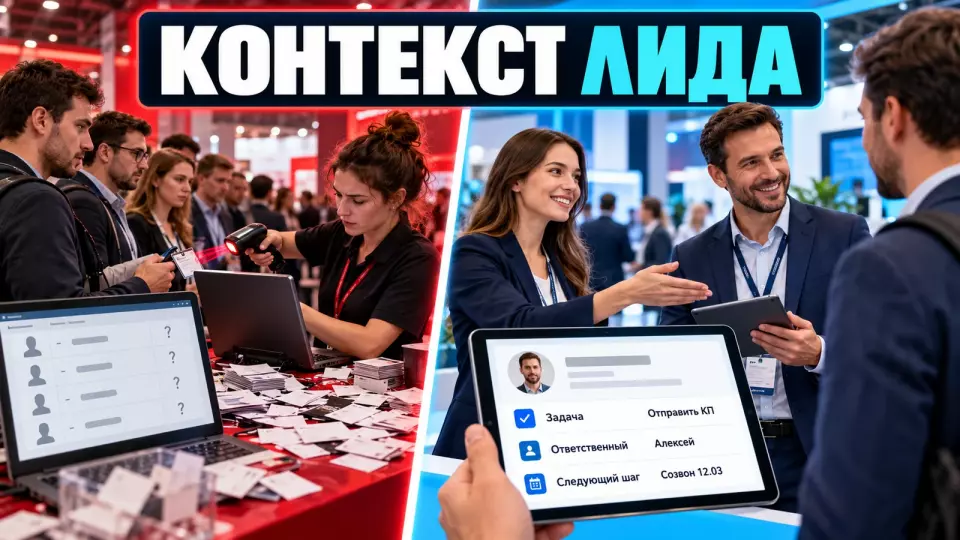
A practical framework for activating a B2B stand: how to qualify a visitor, preserve the meaning of the conversation and hand the next step over to the owner in the CRM.
There may be a queue at the stand, and staff may scan every badge. Sales still risk getting a database without meaning: it's clear who came up, but not what was discussed or who is continuing the contact. B2B means working with a business audience. At Aventura, we see the activation of such a stand as the visitor's entire journey, not just the eye-catching mechanic in the centre of the space.
If the exhibition is already in the plan, request a quote for organising the stand. At the start, we'll connect the space, team roles, activation and contact handover in a single scenario.
What happens after the stand opens
In short: this article begins at the moment when the stand is already open and a visitor approaches it. We look at the first question, qualification, handover to an expert, capturing the context and the next step in the CRM (customer relationship management system). Choosing the concept, testing the interactive element and technical acceptance are covered in separate materials.
We have already set out the overall logic of participation in the article “The exhibition stand as a funnel”. It covers the goal, zones, demonstration, meetings and follow-up contact. Here the focus is narrower: what happens between a visitor's remark at the counter and the task that a specific employee receives after the conversation.
Choosing the mechanics is also outside the scope of this analysis. If the team is still deciding whether an screen, a simulator or another format is needed, it is worth first going through the material on interactive elements at an exhibition stand. And checking the structure, finishing and equipment before opening is covered in the stand acceptance checklist.
The analysis begins when a visitor enters the contact zone. The team recognises their intent, holds the necessary conversation and records the observed facts. It then agrees the follow-up and passes the record to the owner. If even one transition remains verbal, the context begins to fall apart.
Where exactly does lead context get lost?
Context is most often lost at the handover between roles and tools. The greeter may not pass on the reason for the visit to the expert. The expert may miss the task; a scan sometimes ends up with no note and no owner. That is why the team checks the entire chain: from the first question to a completed record and an assigned action.
The most noticeable mistake is the "bare" scan. An employee captures the name, company and contact channel, but not the person's role, their task or what was agreed. After the exhibition, such a contact has to be qualified all over again. A conversation at the stand gives no advantage because its meaning was never saved anywhere.
The second break point appears in handovers between people. The greeter understood that the visitor needed a technical expert, but passed on only the phrase "the colleague is interested in the product." The expert starts a general pitch and again asks questions the person has already answered. With a heavy flow of visitors, this annoys the visitor and takes up the team's time.
The third point is a promise with no owner and no deadline. The wording "send the presentation" does not answer four questions: which material is needed, who sends it, when it should happen and what the visitor expects to receive. Until these fields are recorded, the promise lives only in the employee's memory.
The visitor journey from the entrance to the CRM
The journey is built around the whole team's decisions. At every step, the employee knows what needs to be found out, to whom the visitor should be handed over and how the contact should be concluded. One person will leave with a scheduled meeting, another with promised material, and a third with no follow-up if their task does not fit the company.
At Aventura, we put this journey together before the shift rehearsal. It helps to see where waiting arises, who makes the decision and at what point the record is created.
- Meet and identify intent. The front-line employee asks a short question and understands why the person has come: to solve a work task, see the product, meet the team, get material or simply go through an activation.
- Choose the route. The team hands the visitor over to the relevant employee, invites them to a short demo, schedules a conversation for later or ends the contact without collecting unnecessary data.
- Clarify the context. The team records the role, the task, the project timeline and any other factor that affects the next step at this company.
- Show the relevant fragment. The expert responds to the identified task with the appropriate part of the demo.
- Agree on the follow-up. The visitor understands what happens next: a meeting, a quote, a technical consultation, sending material or no further contact.
- Record and confirm. The employee saves the facts, the owner and the deadline, then repeats the agreement back to the visitor.
- Check the handover. The record appears in the CRM or in a controlled sync queue, and the assigned owner sees the task.
This sequence is needed for both a complex build and a compact area. When organising an exhibition and stand, we link the journey to the floor plan: a quick first contact keeps the demo area free, and the substantive conversation takes place away from the entrance.
How should roles be allocated within the stand team?
Roles are tied to visitor touchpoints. The team needs functions for greeting, qualification, expert conversation, data capture, synchronization control and follow-up execution. In a small shift, one employee can combine several functions. At the same time, each touchpoint is assigned in advance to a specific person and their backup.
A job title alone does not explain the action. A "stand manager" can greet, run demos and record contacts, but during a rush these tasks start to compete. That is why in rehearsal it is more useful to name roles within a specific journey right away.
The table summarizes the key points of the section: Role, Decision at the moment of contact, What is handed over next. Use it as a quick reference when preparing the event.
| Role | Decision at the moment of contact | What is handed over next | Typical loss |
|---|---|---|---|
| Greeter | why the person came over | reason for the visit and the required route | starts a long presentation at the entrance |
| Qualifier | whether there is enough data for the next decision | facts about the role, task and timeline | asks questions unrelated to the route |
| Expert | which part of the solution to show | conclusion of the conversation and promised material | gets lost in details and does not record the outcome |
| Record keeper | whether the card is complete | a structured record | saves a scan without a note |
| Data controller | whether the record reached the system | list of errors and unfulfilled promises | checks the database only after the exhibition |
| Next-step owner | what to do and when | the result of the action in the CRM | assumes another department will take over the contact |
Each role must have a backup. If the expert has gone to a meeting, the team knows who receives the visitor and how to record the wait. If the record keeper changes by shift, open promises are handed over as a separate list, not with the verbal phrase "it's all in the phone".
Lead card: facts, decision and next step
A useful card holds three distinct layers. The first describes the facts of the conversation, the second records the routing decision, and the third explains that decision. This structure reduces reliance on subjective labels such as "hot" and helps the next employee continue the conversation without starting over and re-qualifying the lead.
A badge scan provides the technical basis for the record, if that is how the exhibition platform works. Context emerges after the conversation. It does not require a transcript: short fields that help deliver the promised action are enough.
Facts: the visitor's company and role, the task they articulated, the area of interest, their decision timeline, the material requested and the permitted communication channel. This information helps the next owner understand the situation without questioning the visitor again.
Decision: schedule a meeting, send material, pass the lead to the relevant department, keep the contact for agreed messages, or close the lead. The chosen option must match what was agreed with the visitor and what the team can deliver.
Rationale: the observable signs that led to this route being chosen. If the team uses a priority label, the facts should remain alongside it. That way another employee understands not only the status but also its reason.
A separate block of the card covers the next step:
- the specific action;
- the owner;
- the deadline per an internal rule or a promise to the visitor;
- the expected result;
- the completion status.
The phrase "call back" is too weak. An entry such as "check compatibility with the engineer, then send the answer via the specified channel; owner - product team; deadline - the one given to the visitor" already makes it possible to verify execution.
What to ask so the conversation doesn't turn into a questionnaire
A question stays in the script only if the answer changes the visitor's route or the next step. A long form slows the flow and collects data the team never uses. That's why, before the exhibition, we choose a short mandatory set and move the details into a substantive conversation or a meeting after the event.
The set of questions depends on the product and the sales cycle. Microsoft Dynamics cites budget and a clear decision timeline as examples of qualification criteria, but this is not a universal list. For some products, the technical environment, geography or number of sites matter more. For another task, the key criterion will be the person's role in the approval process.
Check every question against three criteria:
- The answer changes the routing decision.
- The staff member knows how to record the answer consistently.
- The next owner uses the field after the exhibition.
If a field fails this check, the team removes it from the mandatory part. A free-form note remains useful, but it complements the structure rather than replacing it.
We also separate qualification from the presentation. First the staff member understands the task, then chooses the relevant part of the demo. This order is useful not only at an exhibition: it also works when a business event is built around the customer journey and different guests have different reasons for the conversation.
Badge scanning, consent and communication boundaries
Badge scanning can transfer data to the exhibitor if the rules of the specific exhibition and platform provide for it. It does not give blanket permission for any future messages. Before the event, the client checks the basis for the transfer, the wording of the notice, the purposes of processing, the permitted channels and the way to confirm consent or another lawful basis.
Article 9 of Federal Law No. 152-FZ sets out the requirements for consent: it must be specific, substantive, informed, conscious and unambiguous. The burden of proving that consent or another basis exists lies with the operator. Article 18 of Federal Law No. 38-FZ separately regulates advertising via telecommunication networks and requires the addressee's prior consent.
That is why we do not advise the team to explain the scan with the phrase "it's just registration" if the data will go into the CRM and subsequent communication. The visitor needs to be told briefly and honestly why the scan is needed, what they will receive, which channel will be used and where to find the terms.
Before the exhibition, the client should get answers from the organiser, the platform and their legal team:
- what data is opened after the scan;
- who is responsible for processing at each stage;
- what the visitor saw at registration and at the stand;
- whether export to the CRM is permitted;
- which purposes and channels are covered;
- where the confirmation of the basis is stored;
- how to handle a refusal, withdrawal or unsubscribe;
- when the record should be deleted or anonymised.
This section does not replace a legal opinion. The specific scheme depends on the event rules, the roles of the parties, the composition of the data and the purposes of communication.
How to test scanners and data transfer before opening?
A test is considered passed when an employee performs a real scan on a working device, fills in the required fields, sees a confirmation and finds the record in the target system. The person responsible also checks permissions, export, network, backup and manual entry. A demonstration of the interface without the full cycle does not confirm the team's readiness.
Swapcard recommends creating test roles, performing real scans and checking the record, export, devices, network, permissions and QR code format. We supplement this technical test with an operational one: the employee follows the same route they will follow during their shift.
- Assign test users with the same permissions they will have at the exhibition.
- Check every phone or scanner model, not just the manager's device.
- Scan a test badge created according to the live registration rules.
- Fill in the required answers and a short note.
- Make sure the name, company, contacts and context land in the correct fields.
- Check the owner, source, next action and deadline.
- Export the test record or find it in the CRM.
- Disconnect the network and go through the planned offline scenario if the platform supports it.
- Restore the connection and check the sync queue.
- Go through the backup manual entry without bypassing the required notifications and fields.
Technical acceptance of equipment before opening remains a separate task. Here we are interested in the working combination of person, device and system. If an employee cannot find, edit or pass a record to its owner after a scan, the process is not ready yet.
Handover timelines without an invented “golden hour”
In short: verified official sources do not set a single deadline for any exhibition lead. Each company defines its own internal service-level agreement (SLA) based on what was promised to the visitor and the type of action. Every record must have a starting point, an owner, a deadline and a clear completion criterion.
Speed matters, but a number without context is misleading. Sending a promised specification, confirming a scheduled meeting and internal routing require different actions. The company sets the deadlines itself, taking into account the product, the team's schedule and the agreement with the visitor.
The table summarises the key points of this section: Action type, Starting point, What to record. Use it as a quick reference when preparing for an event.
| Action type | Starting point | What to record | How to set the deadline |
|---|---|---|---|
| Requested material | agreement at the stand | material, channel, owner | deadline promised to the visitor |
| Scheduled meeting | slot confirmation | date, participants, topic | before the agreed meeting |
| Handover to an expert | record creation | subdivision, reason, owner | internal routing rule |
| Agreed messages | visitor permitted further communication | basis, segment, channel | deadline per company rules |
| Completion of processing | decision that the contact is unsuitable | reason and comment | before the data reconciliation check |
Control is based on whether the promise was fulfilled, not on whether an email was sent automatically. If a visitor was promised a consultation with an engineer, a standard mailing does not close the task.
Which metrics reveal context loss?
Visitor and scan counts show the volume of traffic, but not the quality of handover. For control purposes, it is more useful to track card completeness, the share of records with a next step, synchronisation errors, duplicates and promise fulfilment. Marketing and sales define each metric in advance so that contacts, leads, promises and completed actions are counted consistently.
UFI recommends looking at lead quality, not just quantity. In this article we do not set "good" percentages: without identical definitions and a comparable sample, such a benchmark would be invented.
A few formulas are enough for a working report:
- Card completeness = records with all mandatory fields / all records.
- Records with context = records with a task and a note / all records.
- Records with a next step = records with an action, owner and deadline / qualified records.
- Handover errors = lost or corrupted records / handover attempts.
- Promise fulfilment = promised actions completed / all promised actions.
- Internal SLA compliance = actions completed by the assigned deadline / actions whose deadline has arrived.
Before calculating, the team agrees on what counts as a visitor, a substantive conversation, a contact, a qualified lead and an opportunity. Cross-check the overall logic of the indicators with the article on event KPIs, and record the definitions for the stand separately.
We publish practical notes on how the team works on site in Aventura's Telegram channel. Working data from specific projects stays within the team.
Shift rehearsal and in-day monitoring
A rehearsal tests the handovers, while shift monitoring helps spot gaps before the exhibition closes. The team acts out a target visitor, a queue, a scanner failure, reluctance to share data and a staff changeover. During the event, the person in charge regularly checks synchronisation, mandatory fields, owners and open promises for each record.
There is no need to assess the stand staff's acting skills during the rehearsal. The task is simpler: to see whether another employee can continue the conversation from the saved record. One participant plays the visitor, a second greets and qualifies them, and a third receives the card as the future owner.
Useful scenarios:
- the visitor is ready to book a meeting;
- a technical specialist is exploring the solution but is not responsible for purchasing;
- an existing client has come with a service question;
- a person wants to take part in the activation without sharing data;
- several visitors arrive at the entrance at the same time;
- the badge cannot be read or the network is unavailable;
- an employee ends their shift with open promises.
Throughout the day, the data controller looks beyond the number of new records. They look for empty mandatory fields, duplicates, records without an owner, overdue promises and scans that never made it into the system. This reconciliation lets you go back to the stand staff while the conversation is still fresh in their memory.
What should the client prepare before the stand goes live?
Before launch, the client needs a compact working package: a journey map, roles and backups, mandatory fields, consent rules, tested devices, a fallback, internal deadlines and a shift monitoring format. Every document should help the team act on site rather than repeat a long project presentation for all participants.
Put everything in one working folder or system:
- a map of the main visitor types and permitted journeys;
- a short opening question for each journey;
- a table of roles, shifts and backup staff;
- a record form with mandatory fields;
- a list of possible next actions;
- a rule for assigning an owner and a deadline;
- agreed wording explaining the scan and links to the terms;
- a test log for devices, network, permissions and export;
- a fallback scenario if the system fails;
- a checklist for reconciliation during the shift;
- shared definitions of a contact, a lead and a fulfilled promise.
Frequently asked questions
We have already outlined the overall logic of taking part in the article “An exhibition stand as a funnel”. It covers the goal, zones, demonstrations, meetings and follow-up contact. Here the focus is different: what happens between a visitor's remark at the counter and the task a specific employee receives after the conversation.
Context is most often lost at the handover between roles and tools. The greeter may not pass on the reason for the visit to the expert. The expert may miss the task; a scan sometimes ends up without a note or an owner. That is why the team checks the entire chain: from the first question to a completed record and an assigned action.
At Aventura we map out this journey before the shift rehearsal. It helps to see where waiting occurs, who makes the decision and at what point the record is created.
Roles are tied to the visitor's transitions. The team needs functions for greeting, qualification, expert conversation, data capture, synchronisation control and follow-up. In a small shift, one employee can combine several functions. Even so, each transition is assigned in advance to a specific person and their backup.
A badge scan provides the technical basis for the record, if that is how the exhibition platform works. Context emerges after the conversation. It does not require a transcript: short fields are enough to help carry out the promised action.
A question stays in the script only if the answer changes the visitor's route or the next step. A long form slows the flow and collects data the team does not use. That is why, before the exhibition, we choose a short mandatory set and move the details into a substantive conversation or a meeting after the event.
At Aventura we can put this package together along with the space scenario and the team's work. If you need to link the activation, the visitor flow and lead handover into a single plan, submit a request via the form.
Sources
- Swapcard: Lead Qualification for exhibitors
- Swapcard: testing the lead scanner before the event
- Federal Law No. 152-FZ, Article 9: consent to the processing of personal data
- Federal Law No. 38-FZ, Article 18: advertising via telecommunications networks
- NIST Privacy Framework: managing risk across the data lifecycle
- Microsoft Dynamics 365: qualifying and converting a lead
Contents
Was this article helpful?