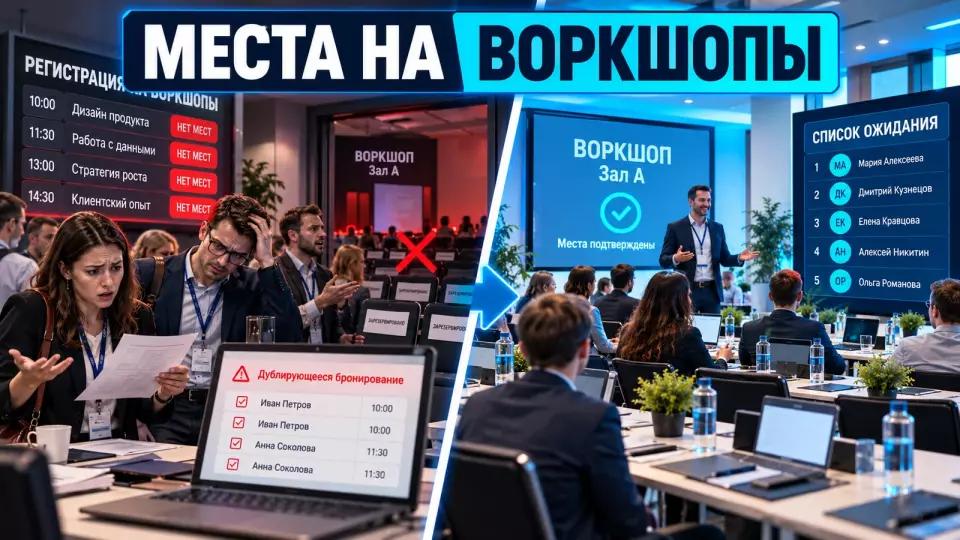
A practical policy for workshop sign-ups: how to count seats, eliminate conflicts, run a waiting list and verify admission on the day of the conference.
Workshop sign-ups at a conference manage a scarce resource: seats, equipment, materials and the facilitator's time. In this article, a workshop means a hands-on session where the participant completes a task rather than just listening to a talk.
At Aventura, we first link the session card, the limit, the personal schedule and the list at the door. If a hands-on programme is part of conference organisation, these decisions need to be made before general registration opens.
If the programme is already put together but the sign-up rules have not yet been described, request a quote and an operational review. We will check the participant's journey from choosing a session to admission to the room.
What to lock in before registration opens
In short: registration for conference workshops opens once the outcome of each session, the working capacity, participant requirements, the permitted number of selections and the way a place is released have all been defined. Separately, set the point at which the automatic waiting list stops working and the decision passes to the coordinator. Without these rules, the form only moves the argument to the workshop door.
A practical session card should answer the questions participants and the team have. What will the person do? What level is required? What should they bring? Is there work on a laptop, with a tool or in pairs? Can you join after the start? What will participants take away from the session?
The minimum workshop passport includes:
- the title and an observable outcome;
- the date, time, duration and room;
- the facilitator and the responsible coordinator;
- prior knowledge or a completed assignment;
- working capacity and equipment setup;
- the rules for selection, cancellation and the waiting list;
- accessibility conditions and a contact for questions;
- the rule on late arrival and admission without prior registration.
Such a passport separates a workshop from a lecture. The participant understands the commitment, and the team knows which resource is tied to each confirmed place.
The general questionnaire and entry check-in are best not rebuilt inside this mechanism. They have a separate process for event participant registration. Pass only the participant ID, the selected sessions and the data that affect admission or preparation into the new form.
Workshop working capacity
Answer: the limit is set by the tightest constraint. It may be the room's safe capacity, the number of full working positions, the number of kits, equipment throughput, or the group size the facilitator can handle without losing hands-on time. The rated chair count is not enough for this calculation.
We count places after furniture and equipment are laid out. If the room fits thirty chairs but there are only twenty laptops or ten work tables for pairs, the limit must reflect the actual mechanics of the task.
The table summarises the key points of this section: Constraint, What to check before publishing the limit, Who confirms. Use it as a quick reference when preparing the event.
| Constraint | What to check before publishing the limit | Who confirms |
|---|---|---|
| Venue | aisles, exits, accessibility, sightlines, ventilation | the venue and the technical coordinator |
| Working positions | tables, power sockets, devices, material kits | the workshop producer |
| Facilitator and assistants | how many participants get help without a long queue | the facilitator |
| Task | whether someone can start later and catch up with the group | the facilitator and the programme director |
| Overall registration | whether the session limit exceeds the event's available audience | the registration owner |
HSE recommends assessing a venue's capacity taking into account the available space, emergency exits, people movement and overall throughput. Suitability checks also consider the audience type, the activity format, the seating layout, venue access and emergency plans. For a Russian conference, the specific safety requirements are confirmed by the venue and the project's responsible specialists. The international material here serves as a guide for the structure of the check, not as a replacement for local regulations.
For several repeats of the same workshop, create separate slots with their own limits. A combined remaining count of 12 places hides an important distinction: the morning may have spaces while the afternoon repeat is already full.
The hands-on part of the programme can be linked to organising master classes. Equipment, materials, assistants and the limit then become part of a single production plan.
How can slot conflicts be prevented?
The system must block two confirmed sessions at the same time and re-run the check when a person is moved from the waiting list. A participant can join the queue for an overlapping workshop, but before confirmation they need to choose one slot. Otherwise, a single available place will create a new double booking. Workshop registration for the conference must check for conflicts on every status change.
On the programme page, show the day, start time, end time and movement between rooms. The system compares more than just identical start times. If one workshop ends at 14:00 and another starts at 14:00 in a remote building, the organiser needs a separate buffer or a warning.
It is convenient to define the selection rules explicitly:
- how many practical sessions can be confirmed per day;
- whether a place on the waiting list can be taken in the event of a conflict;
- which modules run only sequentially;
- whether the same session can be selected again;
- what happens if a place becomes available on an overlapping slot.
Oracle PeopleSoft separately describes re-checking for conflicts when promoting from the waitlist. For the project this is a useful control: the queue can hold interest, but confirmation always goes through a fresh schedule check.
If one option must be chosen, use radio buttons. For multiple sessions with no time conflict, checkboxes with the direct instruction select all that apply are suitable. Options are not pre-selected.
Workshop registration is just one part of organising a business event. The schedule, rooms, equipment and communications must use the same session names and checkpoints.
Leave a request and we'll discuss your task
We'll clarify the event format and suggest the next step.
Registration statuses and the single list
Important: every
participant - sessionpair must have one current status. Email, chat and a local spreadsheet cannot be sources of truth. The coordinator, the host and the registration desk read one list or screens linked to it, with a clear refresh time.
Minimum status model:
The table summarises the key points of this section: Status, What it means, Next action. Use it as a quick reference when preparing your event.
| Status | What it means | Next action |
|---|---|---|
confirmed | the place is reserved | send a confirmation and a cancellation button |
waitlisted | the person is in the queue | wait for a place to free up or leave the queue |
offered | a place has been offered for a limited time | confirm or skip the offer |
offer_expired | the response deadline has passed | pass the place to the next person |
cancelled | the participant has declined | return the place to the available pool |
checked_in | the participant has been admitted | count towards actual attendance |
no_show | the place was held but the person did not come | apply the published rule |
walk_in_waiting | the person is waiting at the door | decide after the cut-off time |
walk_in_admitted | a free place has been given out on site | update the actual list |
The names may differ. What matters more is that the participant, the email service and the venue coordinator understand the status in the same way. The phrase you are registered is unacceptable if the person is in fact only in the queue.
Every manual change stores the time, the operator and the reason. If the host adds an acquaintance in the chat, that decision must go through the shared list. Otherwise there will be two people at the door for one place.
How do you set up a waiting list?
A waiting list needs a procedure, a stopping point and a clear way to offer a place. There are two workable modes: automatic confirmation of the next person, or an offer with a response deadline. The mode is chosen based on the time until the session, the complexity of preparation and the risk of a schedule conflict. The rule is published before registration opens.
Automatic transfer is suitable if the participant has agreed in advance to receive a place without any further action. There is enough time before the session, the requirements are the same, and the system checks for slot conflicts. Microsoft describes transfer in order with registration created and a confirmation sent.
An offer with confirmation is safer when the person needs to prepare, decline another session or quickly confirm attendance. In the offered status, the place is temporarily held. After the deadline the offer closes and the queue moves on.
The table summarises the key points of this section: Condition, Automatic confirmation, Offer with deadline. Use it as a quick reference when preparing an event.
| Condition | Automatic confirmation | Offer with deadline |
|---|---|---|
| Plenty of time before the session | suitable | suitable |
| There is a confirmed slot at the same time | only after an automatic check and a replacement rule | the participant chooses |
| Home preparation is required | risk of unexpected enrolment | preferable |
| A place became available shortly before the start | may not reach the participant in time | a short offer or manual mode |
| Agreed accessibility conditions are required | only when all conditions are ready | allows details to be confirmed |
For each queue, record:
- the order of progression;
- whether the participant can see their position;
- how to leave the queue;
- the response deadline for an offer;
- a repeat schedule check;
- when automatic mode is switched off;
- the priority of the electronic queue versus walk-ins at the door.
Do not promise a place to someone on the waiting list. They should see that the queue records interest and that confirmation will come separately. If the system shows a position, it must update after cancellations and expired offers.
We use Aventura's Telegram channel for short breakdowns of event workflows. You can subscribe in a new tab.
Confirmation and releasing a place
Working rule: after confirmation, the participant receives the title, time, room, requirements and a link to manage their booking. Cancellation should immediately free up the place or trigger the next step in the queue. An email to the administrator can remain a fallback channel, but manual correspondence should not be the only way to decline.
The Decline the place link is needed in the confirmation, the reminder and the personal schedule. After clicking, the system shows the result and updates the list. The participant does not have to wait for a manager's reply in order to free up a scarce resource.
Do not set a universal cancellation deadline for all formats. For a simple discussion, the place can be passed to the next person almost right up to the start. For a lab session with personalised materials or a pre-assignment, the cut-off point comes earlier.
It is useful to send the reminder while the next participant still has time to prepare. A separate message goes to the person moved off the waiting list. It should contain the status, the response deadline and confirm or decline buttons.
The general no-show logic for the whole conference has already been covered in the article how to reduce no-shows at a B2B event. Here we consider only the fate of a specific seat.
What to do about no-shows and walk-ins?
Rule at the door: announce in advance how long a confirmed place is held and whether entry after the start is allowed. The coordinator applies one rule for everyone and does not exceed the working capacity. The electronic queue and participants without a prior booking must not compete on a hidden priority. The decision is recorded in the up-to-date list.
There are two honest models. In the first, the organiser forms an on-site queue and, after the cut-off time, gives away the places that are actually empty according to a published order. The second model prohibits walk-ins: the freed place goes to the next person on the electronic list.
UNC, in the description of a specific makerspace workshop, uses an on-site queue and a short cutoff. UW-Whitewater, by contrast, does not accept on-site registration. These rules show different operational decisions and do not set a universal waiting time.
Allow admission without a booking if:
- materials can be issued quickly;
- the participant can safely join before the established moment;
- there is an up-to-date list at the door;
- the electronic queue has already been processed according to the announced rule.
Prohibit walk-ins if a pre-assignment, an access check, a personalised kit or continuous safety briefing is required. After the start, late entry may disturb the group or create a risk.
Overbooking cannot be based on someone else's percentage. If a project wants to test this approach, it first collects its own history for comparable formats: paid or free, time, audience, type of assignment and method of confirmation. The physical limit is not exceeded in the process.
Accessibility and Data Minimisation
Important: the registration form must be keyboard-operable, clearly report errors and provide a channel for requesting special conditions. Collect only the information that changes preparation or admission. A diagnosis, a detailed biography and unnecessary demographic fields are not needed to choose a workshop.
The W3C recommends short forms with clear labels and instructions. A long selection can be split into steps: programme, sessions, schedule check, participation conditions and final confirmation. The participant sees progress and can correct their selection before submitting.
The request for special conditions is phrased as an action: What do you need in order to be able to participate? Possible answers include a step-free route, space for a wheelchair, subtitles, sign language interpretation, an accessible format for materials or another condition. Only those responsible for preparation have access to the answers.
A minimal registration usually contains the participant ID, the selected session, status, time of modification and a contact for notifications. A name is needed if it is used by the list at the door. Company and job title are acceptable only when there is a clear purpose. The retention period and deletion are set by the data controller in their own model.
To choose a room, check the venue catalogue in advance and the actual accessibility of the required room after the equipment has been laid out. The label accessible hall without a tested route does not confirm participation.
How to manage the door at a workshop
Admission procedure: before the doors open, the coordinator checks the workstations, the current list and the agreed participation terms. During admission, they record each entry in a single system. At the cut-off point, they release only genuinely empty places, apply the announced priority and stop admitting people once the limit is reached. The team sees all changes immediately.
Before the start, the team follows these steps:
- check the layout, aisles, exits and workstations;
- verify the equipment, materials and number of kits;
- open the current list showing the time of the last sync;
- check confirmed participants, the queue and special conditions;
- prepare a backup list in case there is no internet connection;
- appoint the person authorised to change statuses;
- remind the host and the administrator of the late-arrival rule.
When the doors open, confirmed participants are given the status checked_in. The electronic waiting list and people without a booking are counted separately. Until the cut-off point, a booking is not released just because someone has the impression that a person is not coming.
At the cut-off point, the coordinator counts how many people have actually been admitted. They then offer free places in the published order. Every decision is recorded in the system so that the email, the personal schedule and the host's list do not diverge.
After the start, the host allows late entry according to a rule agreed in advance. The coordinator does not add anyone over the limit out of politeness. If there are no places left, they offer a repeat session or another format rather than an argument at the door.
Keep the general scheme for moving between rooms separately. You can cross-check it against the material on managing flows at a multi-track conference.
Post-conference metrics
What to measure: after the event, compare confirmed places with actual attendance and review how the queue moved. Your own data is needed to set the next cap, the confirmation deadline and the decision on whether to repeat. External sources describe mechanics but do not provide universal target percentages for a corporate conference.
Collect for each session:
- the working cap and the number of confirmations;
- actual check-in;
- on-time cancellations;
- people moved off the waiting list;
- offers that expired without a response;
- schedule conflicts when promoting people;
- no-shows and late arrivals;
- walk-ins admitted and turned away;
- cases of manual addition;
- requests for special conditions and whether they were met.
Compare only similar workshops. A free morning discussion and an evening lab with equipment produce different attendance. A single overall rate would hide the reasons.
Frequently asked questions
The practical session card should answer the participant's and the team's questions. What will the person do? What level is required? What should they bring? Is there work on a laptop, with a tool or in pairs? Can people join after the start? What will they take away after the session?
Answer: the cap is set by the tightest constraint. It may be the safe capacity of the room, the number of full working positions, the number of kits, equipment throughput or the group size the facilitator can handle without losing the practical element. The rated number of chairs is not enough for this calculation.
The system should block two confirmed sessions at the same time and repeat the check when moving a person off the waiting list. A participant can join the queue for an overlapping workshop, but before confirmation they need to choose one slot. Otherwise one free place will create a new double booking. Registration for conference workshops should check for conflicts on every status change.
Minimum status model:
The waiting list needs an order, a cut-off point and a clear way of offering a place. There are two working modes: automatic confirmation of the next person or an offer with a response deadline. The mode is chosen based on the time until the session, the complexity of preparation and the risk of schedule conflicts. The rule is published before registration opens.
Working rule: after confirmation, the participant receives the title, time, hall, requirements and a link to manage their registration. A cancellation should immediately free the place or trigger the next step in the queue. Emailing the administrator can remain a fallback channel, but manual correspondence should not be the only way to opt out.
At Aventura, we use the final review to change the session card, the cap, communications and door operations in the next project. If you need to bring the programme, registration, venue and coordinator work into one system, request a quote.
Sources
- HSE: Venue and site design.
- W3C WAI: Forms Tutorial.
- W3C WAI: Multi-page Forms.
- GOV.UK Design System: Checkboxes.
- GOV.UK Design System: Radios.
- Section508.gov: Accessible meetings.
- ICO: Data minimisation.
- Microsoft Learn: Set up and manage an event waitlist.
- Oracle PeopleSoft: Managing Wait Lists.
- UNC Student Affairs: example of a makerspace workshop.
- UW-Whitewater: example of workshop registration.
Contents
Was this article helpful?