
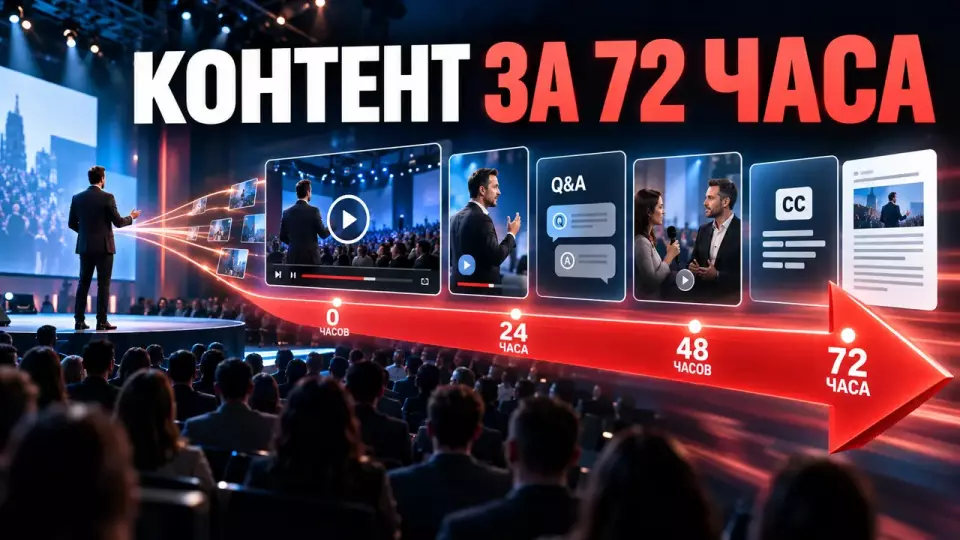
A practical plan for releasing post-conference content: full talk, short recap, Q&A, interviews, subtitles, rights, and approvals.
Post-conference content is best planned before the first speaker takes the stage. Then the full recording, short recap, Q&A, interviews, photos, and text materials are assembled as distinct products. Each has an audience, deadline, owner, rights, and readiness criterion. Otherwise, the film crew brings back a lot of files, and the editorial team starts figuring out all over again what needs to be published from them.
At Aventura, we start with the release matrix. It connects the program, shooting plan, editing, fact-checking, rights, subtitles, and publication. We use the 72-hour window as a working framework for the priority package. It does not mean that any volume can be released in the same timeframe.
We cover the practice of organizing business events and working with materials in Aventura's Telegram channel.
Post-conference content: what to prepare in advance?
Before the event, the team approves a list of standalone releases instead of an abstract 'post-conference video'; for each piece of content, it records the audience, source, person responsible, and approver. In the same row, it specifies rights, channel, and the viewer's next step. This list is included in the brief, budget, script, and technical rehearsal. Then editing starts with a ready task, and the editorial team does not have to review the entire archive without priorities.
The same program block can yield several pieces of content. The keynote is preserved in full. A short overview conveys the main decisions. The Q&A session gets a separate publication if it has standalone practical value. An interview explores one topic in more depth. Photos and quotes support the email, website, and internal channels.
Before the shoot, we assemble five working sets:
- The final program with names, job titles, and correct spelling of terms.
- A release map with formats, channels, and owners.
- A rights matrix for talks, images, music, slides, and demos.
- Templates for titles, covers, descriptions, subtitles, and links.
- An approval route with one current version and a clear response time.
We test recording and export on technical event rehearsal. The test includes program audio, a backup track, camera synchronization, presentation readability, file transfer, and a trial export. If the test ends with just a picture on the monitor, post-production remains untested.
A release matrix for different objectives
One video won't cover all tasks. We leave the full recording for those who need the entire report, while a short overview leads to the main decisions. We publish questions and answers separately when they are useful without the context of the whole session. An interview deepens one topic, and a summary helps quickly find the needed point.
At Salesforce and Apple, these tasks are separated into individual publications. Salesforce posted the full Dreamforce keynote, a “less than seven minutes” version, and a separate Q&A release. Apple published a short official overview of its September event. These examples show different levels of depth, but each company’s package composition is determined by its own brief.
The table summarizes the key points of the section: Release, Who It's For, Main Task. Use it as a quick reference when preparing the event.
| Release | Who it's for | Main objective | Readiness criterion |
|---|---|---|---|
| Full recording | participants and professional audience | сохранить выступление целиком | Keep the full talk |
| clean start and end, audio, chapters, captions, subtitles | Short recap | broad business audience | quickly convey the takeaway and lead onward |
| Q&A | one key point, clear captions, one next-step link | clients, partners, users | keep practical answers |
| Interviews | questions audible, answers verified, open questions separated | audience for a specific topic | reveal the speaker's position |
| clear topic, confirmed job title, separate description | Vertical clips | social channels | drive to the full content |
| captions in the safe zone, meaning clear without context | читатели и поисковая аудитория | readers and search audience | provide quick access to key points |
| facts verified, quotes accurate, links lead to the primary source | Photo gallery | participants, media, internal channels | capture people and context |
For each release, we add a buffer. If the full recording is delayed, approved photos and the text summary can be released earlier. If part of the Q&A requires verification, confirmed answers are released separately, while open questions remain in the working register. The buffer preserves meaning and does not pass a draft off as a finished result.
How to gather material suitable for editing?
The camera must capture more than just a beautiful wide shot. Editing needs clean sound, complete answers, close-ups of the speaker, the presentation, audience reactions, product details, and transitions between segments. Each important fragment is linked to context: who is speaking, about what, whether it can be published, and who will confirm the wording. Such a log shortens the search and reduces the risk of an incorrect caption.
We link the script and the shooting plan. The director marks the start of a key point, a question from the audience, a demonstration, and the next step. The editor receives the actual program and the list of changes. The video editor sees markers instead of reviewing all the footage searching for an unknown line. The rights specialist immediately flags fragments that cannot be released without a separate decision.
A shooting segment card may contain:
The table summarizes the key points of the section: Field, What to Capture. Use it as a quick reference when preparing the event.
| Field | What to record |
|---|---|
| Program block | stable session title |
| Speaker | confirmed name and title |
| Contents | thesis, question, answer, or demonstration |
| File and timecode | link to the source and exact location |
| Fact status | confirmed, needs verification, do not publish |
| Rights | allowed channels and restrictions |
| Releases | full recording, recap, Q&A, interview, clip |
| Owner | who makes the final decision |
We record clean program audio separately from the camera audio. For interviews, we choose a place where speech is audible and the background does not compete with the subject. We pass names and terms to the editor in a verified glossary. We save presentations in the version that was shown. These actions are easier to build into the event day than to reconstruct a few days later.
If you want to link the program, filming, and the post-event content package in advance, Simply specify the city, number of participants, desired area of support, and a possible partner.. We will clarify the number of streams, release formats, rights, languages, and the approval route.
The first 72 hours: four working windows
The plan divides the first 72 hours into four windows and runs several tracks in parallel. Editing, fact-checking, rights, subtitles, and approvals should not wait for each other in one long queue. The composition of each window depends on the program and the team. The timeline below serves as a management framework, not a public guarantee of releasing any volume.
The table collects the key points of the section: Window, What the team does, What may be released. Use it as a quick guide when preparing the event.
| Window | What the team does | What can be released |
|---|---|---|
| 0-6 hours | receives and copies source files, checks the program, starts transcription, marks blocked fragments | approved photos, a short summary, or a final short video |
| 6-24 hours | assembles the recap, cleans the main recording, checks names and facts, edits subtitles | short overview, summary, first version of the hub page |
| 24-48 hours | formats Q&As and interviews, creates themed clips, links the materials | full recording, individual answers, interviews, and a letter to participants |
| 48-72 hours | checks the final pages, opens the hub, hands over the press kit, archives rights and versions | linked priority package and a second layer of materials |
In the first hours, the team checks file integrity and makes a backup. Transcription starts immediately but remains a draft. The editor verifies the actual order of sessions, names, and program changes. Priority goes to materials for which rights and a short review route already exist.
In the second window, a short overview with one message appears. At the same time, a full recording of the main session is being prepared. It gets clean start and end, proper sound, captions, and chapters. Fact-checking verifies names, job titles, figures, and product wording. Subtitles are edited against the recording rather than accepted automatically.
In the following windows, we separately release questions and interviews that are valuable in their own right. A strong answer does not need to be hidden at the end of a long broadcast. A separate video gets a precise title, description, and a link to related material. By 72 hours, priority publications are collected on one page, while source files, releases, and final versions move into the working archive.
Who approves the final version?
У каждого выпуска должен быть один владелец и один человек с правом финального решения. До него версия проходит три проверки: спикер подтверждает смысл реплики, редактор - факты и язык, профильный специалист - права. Продюсер собирает статусы и комментарии по таймкодам, но не решает за этих людей.
We use an approval card similar to the decision card in the event approval calendar:
- What exactly is being approved.
- Where the single current version is located.
- What question the reviewer needs to resolve.
- Who makes the final decision.
- Which materials depend on the answer.
- What will happen in case of delay.
- Which version passed the re-review.
Статусы должны быть однозначными: принять, вернуть на конкретную правку или не выпускать. Фраза «в целом хорошо» ещё не разрешает публикацию. После изменения утверждённой версии прежнее согласование теряет силу. Новый экспорт получает новый номер, а замечание закрывается только после контрольного просмотра.
Рабочий мессенджер подходит для уведомления, но не для хранения финальных комментариев. Правки по видео удобнее собирать по таймкодам. Документы и подписи проходят тот же принцип версий. Перед публикацией команда проверяет конечную страницу: файл, обложку, субтитры, главы, ссылки, форму и мобильный просмотр.
Rights, facts, and a publication stop list
До записи мы проверяем изображение человека, персональные данные, музыку, слайды и чужие материалы, а участников заранее уведомляем о целях записи, каналах публикации и порядке обращения. Необходимые для сценария согласия оформляют до записи и дальнейшего использования материалов; съёмка в зале и публикация крупного портрета рассматриваются отдельно. Регистрация не даёт автоматического согласия на будущую рассылку. Состав уведомления и форму согласий проверяет юрист заказчика.
Статья 152.1 Гражданского кодекса устанавливает общее правило согласия на обнародование и дальнейшее использование изображения гражданина и описывает исключения. If a person becomes the main subject of a video, interview, cover, or testimonial, we prepare in advance the consent required for the selected use and record the permitted channels and term.. Consent to the dissemination of personal data is formalized separately in accordance with Federal Law No. 152-FZ.
Music that was legally played at the venue does not automatically become cleared for an online video. Presentations, illustrations, archive footage, product demos, and partner logos are checked separately. The team stores the source of rights, platforms, territory, term, and attribution requirements. An unclear status blocks the specific fragment. A rush export does not resolve rights issues.
Pre-release stop list:
- incorrect name, title, date, number, or product wording;
- unconfirmed quote or an answer to a deferred question;
- close-up of a person without a verified basis for publication;
- badge, contact info, document, or closed screen in frame;
- music, slide, illustration, or archival fragment without clear rights;
- draft presentation and internal correspondence;
- link to an open working archive or a review page;
- automatic subtitles without checking names and terms.
We separate public, restricted, and internal materials. The finished recap can be public. A recording for registered participants receives an access list and term. Source files, draft transcripts, and the revision log remain within the project team. Contracts, contacts, closed slides, and unannounced information do not go into the public package.
How to release an accessible version of the video?
The finished video includes verified subtitles, clear speaker labels, and navigation for a long recording; for important sessions, a text transcript is useful. It lets you read, search for a term, and return to the right place. Important information on a graphic or screen must be spoken or given a text explanation. Automatic transcription speeds up the draft but does not replace editorial review.
W3C describes captions as the textual representation of speech and significant non-speech audio information. In subtitles, it is important to identify the speaker and significant sound, maintain synchronization, and check the meaning. We always proofread automatic captions: surnames, accents, and background noise often distort the transcription.
At a business conference, particular attention is paid to surnames, job titles, product names, abbreviations, and numbers. We verify them against the glossary and the source recording. Titles must not overlap the speaker labels. The vertical version gets a separate layout so that cropping does not cut off a face, slides, or text.
Accessible version checklist:
- Subtitles match the speech and have been proofread.
- Names, terms, and numbers have been verified.
- Speech and important sounds are marked.
- The long recording is divided into clear chapters.
- The transcript is available as a separate text or file.
- Significant visual information has been explained.
- The video has been checked without sound and on a mobile screen.
- The final file has been opened in the final player.
We covered the full accessibility path for the broadcast and recording in the article about accessible event streaming.
The content journey after publication
Individual posts quickly sink down, so the package is assembled on a hub page in one clear place. First, the viewer sees a short summary, then chooses the full recording, a separate answer, or an interview. The recap helps find the needed point, while the presentation and the materials request form provide a clear next step.
A hub does not have to be a complex section of the site. It needs a clear conference name, a short summary, a featured video, a list of sessions, available materials, and contacts for the next step. Private recordings are separated from public ones. Access rights are checked before the email is sent to participants.
Different audiences get different entry points:
The table brings together the section's key points: Audience, First material, Next step. Use it as a quick guide when preparing the event.
| Audience | First material | Next step |
|---|---|---|
| Participant | short summary and promised materials | watch the recording, get the presentation or an answer |
| Did not participate | recap and summary | go to the full session or the next event |
| Client or partner | thematic interview or demo | discuss the solution with the responsible employee |
| Employee | internal package and management decisions | open the recording, document, or work task |
| СМИ | verified package of materials | request a comment or an approved file |
We do not mix a personal response after the event with a bulk email. If a participant was promised an answer to a question or a document, the register keeps the subject, owner, agreed channel, and status. It is better to set these statuses already during participant registration: тогда обещанный ответ или документ не потеряется после конференции.
What to measure after release?
The metric depends on the release objective. For the full recording, we look at whether viewers reach the relevant chapters; for the short overview, whether they move on to the full material. It is convenient to lock the remaining metrics into a table before publication. Views alone do not prove a business result.
До публикации мы задаём единые правила названий ссылок и UTM-метки. Хаб отделяет переходы из письма, социальных каналов, партнёрской публикации и внутренней рассылки. Dance groups записывает стартовые значения после выпуска, но не объявляет успех через несколько часов. Нужен период наблюдения, соответствующий циклу принятия решения аудитории.
Практичная таблица измерения:
В таблице собраны ключевые пункты раздела: Release, Table. What to measure after release?, What to check immediately. The table summarizes the key points of the section: Point, What the candidate gets, What the team records
| Release | Table. What to measure after release? | What to check immediately |
|---|---|---|
| Recap | What to review later | publication accuracy, click-throughs to the hub |
| Full recording | share of click-throughs to in-depth material | playback start, chapters, subtitles, player errors |
| Q&A | retention on key sections | click-throughs to individual questions |
| Interviews | repeat views and related inquiries | views and click-throughs by topic |
| captions in the safe zone, meaning clear without context | next meaningful contact | reading and link performance |
| click-through to the recording, material, or form | доставка и корректность сегмента | delivery and segment accuracy |
На разборе мы отдельно смотрим, где была проблема: в самой сессии или в её упаковке и распространении. Если зрители не переходят дальше, проверяем название, обложку, канал и следующий шаг. Эти наблюдения заносим в бриф следующей конференции.
Budget and team composition
Расчёт зависит от числа залов, длительности записи, количества выпусков, языков, скорости выдачи, числа согласующих и требований к правам. Сначала фиксируем матрицу, затем считаем съёмку, монтаж, звук, графику, субтитры, расшифровку, хранение и публикацию. Одинаковое число камер может дать разный объём работы после события, если пакеты материалов различаются.
В проекте нужны функции, а не обязательно отдельный человек на каждую строку:
- click-throughs to promised materials
- producer connects the program, owners, and deadlines;
- recording director is responsible for usable source materials and the log;
- editor checks meaning, facts, and captions;
- video editor assembles versions and preserves the file structure;
- rights specialist manages restrictions and permissions;
- subtitle editor checks speech, terminology, and synchronization;
- client's responsible person approves the final version;
В смете мы отдельно показываем, какой риск закрывает резерв. Это может быть резервная запись звука, дополнительное хранение, второй экспорт, срочная вычитка или отдельная версия для закрытого канала. Объём резерва определяется брифом. Универсальный процент или фиксированная цена без программы только создают ложную точность.
Frequently asked questions
Before the event, the team approves a list of standalone releases instead of an abstract 'post-conference video'; for each piece of content, it records the audience, source, person responsible, and approver. In the same row, it specifies rights, channel, and the viewer's next step. This list is included in the brief, budget, script, and technical rehearsal. Then editing starts with a ready task, and the editorial team does not have to review the entire archive without priorities.
One video won't cover all tasks. We leave the full recording for those who need the entire report, while a short overview leads to the main decisions. We publish questions and answers separately when they are useful without the context of the whole session. An interview deepens one topic, and a summary helps quickly find the needed point.
The camera must capture more than just a beautiful wide shot. Editing needs clean sound, complete answers, close-ups of the speaker, the presentation, audience reactions, product details, and transitions between segments. Each important fragment is linked to context: who is speaking, about what, whether it can be published, and who will confirm the wording. Such a log shortens the search and reduces the risk of an incorrect caption.
The plan divides the first 72 hours into four windows and runs several tracks in parallel. Editing, fact-checking, rights, subtitles, and approvals should not wait for each other in one long queue. The composition of each window depends on the program and the team. The timeline below serves as a management framework, not a public guarantee of releasing any volume.
У каждого выпуска должен быть один владелец и один человек с правом финального решения. До него версия проходит три проверки: спикер подтверждает смысл реплики, редактор - факты и язык, профильный специалист - права. Продюсер собирает статусы и комментарии по таймкодам, но не решает за этих людей.
До записи мы проверяем изображение человека, персональные данные, музыку, слайды и чужие материалы, а участников заранее уведомляем о целях записи, каналах публикации и порядке обращения. Необходимые для сценария согласия оформляют до записи и дальнейшего использования материалов; съёмка в зале и публикация крупного портрета рассматриваются отдельно. Регистрация не даёт автоматического согласия на будущую рассылку. Состав уведомления и форму согласий проверяет юрист заказчика.
If you are planning a business conference, we will calculate a related package of materials: recordings, short versions, interviews, subtitles, and a hub page. Leave a request, to discuss the program, rights, and approval timelines.
Sources
- Salesforce: Dreamforce Main Keynote 2026
- Salesforce: The Dreamforce 2026 Keynote in Under 7 Minutes
- Salesforce: Live Q&A with Product Leaders
- Apple: official short overview of Apple Event September 2026
- W3C: Captions (Prerecorded), WCAG 2.2
- W3C: Media Alternative (Prerecorded), WCAG 2.2
- Civil Code of the Russian Federation, Article 152.1 “Protection of a Citizen’s Image”
- Federal Law No. 152-FZ, Article 10.1
- Federal Law No. 38-FZ, Article 18 “Advertising Distributed via Telecommunication Networks”
- Civil Code of the Russian Federation, Article 1270 “Exclusive Right to a Work”
Contents
Was this article helpful?

Looking for an idea or someone to bring your vision to life? Event Agency Aventura has been organizing events in Moscow and across Russia for 16 years. Leave your number and our manager will call you back.
