A Q&A format that works at a conference: how to collect questions from the room and online, assign roles, keep uncomfortable questions and follow up after the session.
Question moderation at a conference starts before the speaker walks on stage. If you leave the Q&A session to the last minutes, the room, the app and the online chat will start competing with each other. We set a single route in advance: where a question comes in, who checks it, how it reaches the host and what happens if it goes unanswered.
Send a request and we'll discuss your task
We'll clarify the format of your event and suggest the next step.
Why consolidate questions into a single queue?
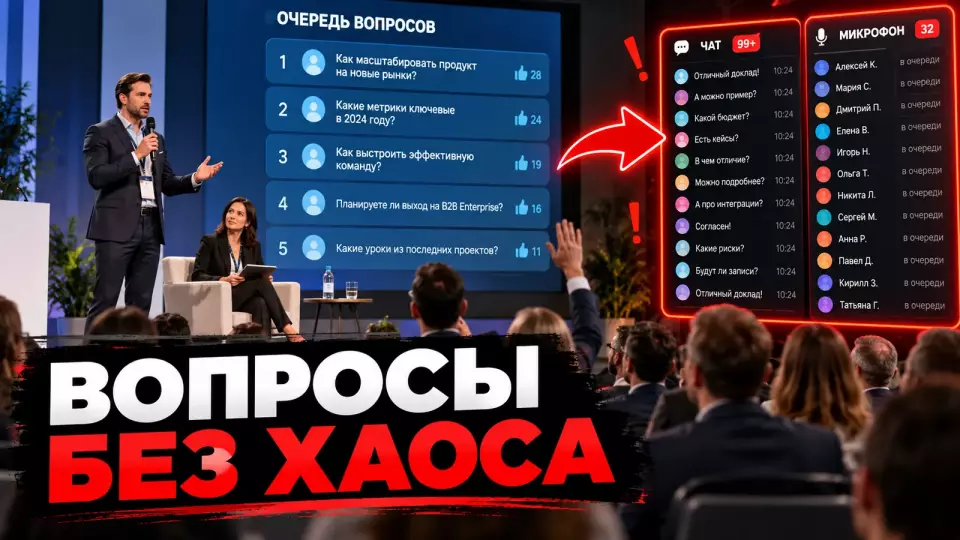
In short: a single queue gives the host one clear feed instead of several competing channels. The editor sees questions from the room and from online, removes obvious duplicates, notes the addressee and passes a ready-made wording to the host. The in-person audience no longer gets an advantage simply because it is closer to the microphone.
Without a shared queue, the host has to choose between raised hands, chat messages, the app screen and the director's prompts. Repetitions clog the queue, and late questions are lost before the session ends. Online participants wait until everyone in the room has finished speaking and get the leftover time.
A single queue does not mean a single way to submit. A participant can use a microphone, a form, an app or a chat. All inputs converge on one editor, who assigns the question a topic, an addressee and a status.
At Aventura, we first define the outcome of the session. For a panel discussion, different positions matter. For a product presentation, practical clarifications matter. For a strategy meeting, questions that help understand the decision and next steps matter. The queue editor needs this criterion; otherwise they will choose based on personal impression.
When organising conferences, we build Q&A into the timing and the technical brief along with the talks, transitions between blocks and the host's work. Questions do not remain a random add-on to the programme.
Channels: the room, the app and the chat
There should be one main channel, but there can be several ways to access it. For a large session, a written Q&A feed with pre-moderation works well. A microphone, a raised hand and an online chat become additional entry points. A QR code is always backed up by a short URL, and the team keeps a fallback that works without the internet.
In Slido, Microsoft Teams, Zoom and Mentimeter, questions follow a similar path. A participant submits a question, a moderator reviews it, and once it is published the audience can vote. The team puts the question on air, marks it as answered or, if the service supports this feature, answers in writing. Before sending out anything, we check the actual settings of the chosen service.
The table summarises the key points of this section: Channel, When it works well, Risk. Use it as a quick reference when preparing your event.
| Channel | When it works well | Risk | What the team does |
|---|---|---|---|
| Q&A in the app or browser | large audience, multiple tracks | participant hasn't opened the link | displays the QR code and short URL, keeps instructions on screen |
| Microphone in the room | small-group discussion, follow-up dialogue | a monologue instead of a question, a physical queue | limits time and moves the question to the shared feed |
| Online chat | technical remarks and quick clarifications | questions get mixed up with links and reactions | a technical moderator moves substantive questions into the queue |
| Questions in advance | a sensitive or complex topic | the question is outdated after the talk | marks the status and checks whether it is still relevant |
| Paper card | fallback and audience without a smartphone | slow delivery | a volunteer collects the cards and passes them to the editor |
Chat is rarely suitable as the only channel. Technical messages, reactions and links all appear there at the same time. A question quickly moves up, and sorting by topic and speaker requires manual work. If the platform allows, the regular chat is kept for support, while questions are collected in a separate panel.
A QR code must not be the only entry point. A short URL is printed next to it. For participants without a suitable device, a microphone, a card or staff assistance is available. A short URL lets a participant check the domain and open the form without scanning a QR code.
What the editor checks before publishing a question
A new question first goes into a closed queue. The editor checks whether it is on topic, whether it duplicates another question and whether it reveals anyone else's data. The editor then publishes the question, asks for the wording to be clarified, or sets it aside for a written answer after the session. A critical question stays in the queue if the announced rules have been followed.
We use pre-moderation to keep to the timing and remove clear violations. It must not turn into a filter for convenient opinions. We explain the criteria to participants in advance, and the editor records for the team why a question was merged, deferred or rejected.
The working cycle looks like this:
- The question is assigned a time, a channel and a recipient.
- The editor checks whether it relates to the session topic.
- Clear duplicates are merged, but the number of supporting participants is preserved.
- Long wording is shortened without changing the author's position.
- Third-party personal data is removed.
- The question is published, moved to follow-up, or rejected with an internal reason.
- After the answer, the editor sets the status: answered, partially answered, written answer needed.
Slido and Teams use closed moderation sections. Mentimeter allows a separate link for the moderator. This confirms an important organisational point: the queue can be handed over to a dedicated person, leaving the host with only the finished list.
The editor needs a short reference guide to topics and speaker names. Their task is to quickly route a question to the right topic and speaker while preserving the original meaning. For a complex programme, we prepare several tags in advance, for example "programme", "security" and "technical support".
If you are putting together a programme with several rooms, you may find our material on workshop registration and limiting places useful. In both cases, the participant needs a clear status, and the team needs a single queue rule.
We publish short breakdowns of event processes in the Aventura Telegram channel.
Team roles during Q&A
For a large session we assign at least two people: a host and a queue editor. In a hybrid format we add a technical moderator who monitors online participants, microphones and the backup channel. At a small meeting the roles can be combined, but stage hosting and intensive pre-moderation are best kept separate.
The host listens to the answer, asks follow-up questions, keeps an eye on the pace and links topics together. If they are also reading dozens of incoming messages at the same time, the conversation becomes choppy. The speaker gets a question without context, and the audience sees long pauses.
The queue editor works at a separate screen. They publish questions, merge duplicates, tag the addressee and prepare a short wording for the host. The technical moderator monitors remote raised hands, sound, the support chat and the backup channel.
The table summarises the key points of this section: Role, Before the session, During Q&A. Use it as a quick reference when preparing your event.
| Role | Before the session | During Q&A | After the session |
|---|---|---|---|
| Host | checks the topics and answer rules | reads out the question, keeps the pace, asks follow-ups | notes topics to follow up on |
| Queue editor | prepares tags and criteria | reviews, merges, publishes, changes statuses | exports unanswered questions |
| Technical moderator | tests channels and access | monitors online participants, microphones and the backup | saves the session log and technical notes |
| Speaker coordinator | talks through boundaries and format | helps with facts and the promised follow-up | collects written answers |
The speaker also gets instructions. A short answer is usually more useful than a long improvisation. If documents or verification are needed to answer, the host records a promise of a written follow-up instead of guessing on stage.
Leave a request - let's discuss your task
We'll clarify the event format and suggest the next step.
Rule for choosing the next question
The number of votes shows audience interest, but the decision rests with the editor and the host. They consider the topic, novelty, clarity, the addressee and the remaining time. The host alternates topics and does not give the whole block to one group. A clear share of time is set aside in advance for the room and for remote participants.
Ranking by votes elevates popular questions. When sorting by reactions alone, the editor should bear in mind the possible advantage of questions published earlier and of more prominent wording.
We use a hybrid rule:
- First we check compliance with the topic and the rules.
- We merge duplicates and preserve the shared interest.
- We count votes as one of the signals.
- We alternate topics and addressees.
- We leave room for the audience in the hall and remote participants.
- We do not take a second question if the first has already received the same answer.
- Before wrapping up, we choose a question that helps draw a practical conclusion.
The IETF uses a shared digital microphone queue for in-person and remote participants. For a commercial conference it is not necessary to copy the tool, but the principle itself is useful: location should not determine priority.
If a question is addressed to a different speaker, the editor changes the addressee. If a topic is important but does not fit into the session, the question is given the status of a written answer. The phrase "we didn't get to it" without any further routing undermines trust in the question collection.
Anonymity and participation rules
Participants need a clear explanation of who can see their name and what data the platform stores. A hidden name on screen does not mean technical anonymity: the organiser or the service operator may process service identifiers and other data under their own privacy policy. Before launch, we check the settings, the available exports and the rules of the chosen platform.
In practice, there are three modes:
- the name is shown to the audience, the organiser and the platform;
- the name is hidden from the audience but available to the organiser or the platform;
- the platform accepts a question without a name, but may process technical data under its own privacy policy.
A submission can be called fully anonymous only when this is explicitly confirmed by the platform's documentation, its data processing policy and a check of the exports available to the organiser.
Anonymous mode lowers the barrier to asking a sensitive question. At the same time, the pre-moderation workload grows. An academic study of Q&A communities links anonymity to a greater willingness to ask sensitive questions and to more frequent trolling. The practical conclusion is to keep the option of anonymous submission alongside clear rules.
Before the session, participants are told:
- where to ask a question;
- whether they can send it in advance;
- who can technically see their name;
- that questions go through pre-moderation;
- how duplicates and long formulations are handled;
- that votes do not guarantee an answer;
- where a question that was not asked will go;
- how to report a violation;
- who processes personal data and why it is needed;
- what data the organiser and the platform operator receive;
- the retention period for questions and which employees have access;
- where the privacy policy and consent are, if the form collects a name, contact details or other personal data.
It is better to show the rules next to the form rather than hide them in a long document. A detailed approach to participant data is covered in the article on event registration under Federal Law No. 152-FZ.
What to Do About Uncomfortable and Toxic Questions?
In short: an uncomfortable question can be substantive and should stay in the queue. The moderator assesses the form and relevance to the topic, not the speaker's comfort. Insults, threats, discrimination, disclosure of others' data and personal attacks are not published. A borderline wording can be shortened while preserving the author's position.
A critical question tests a decision, product or position. Toxic text attacks a person, threatens, discloses data or disrupts the session. These categories must not be mixed. Otherwise the audience quickly realizes that pre-moderation is being used as censorship.
The table summarizes the key points of this section: Question type, Decision, Explanation for the team. Use it as a quick reference when preparing an event.
| Question type | Decision | Explanation for the team |
|---|---|---|
| tough but on topic | publish | prepare a short neutral wording |
| duplicate | merge | preserve votes and the original meaning |
| long monologue | shorten | keep the verifiable question and the author's position |
| personal data of a third party | anonymize or do not publish | forward to a closed channel if a review is needed |
| insult or discrimination | do not publish | record the decision category |
| threat | do not publish and escalate | retain the material per internal policy |
| off-topic | move | offer a written response or another session |
The ACM conference code separates criticism of work from attacks on a person and classifies threats, discriminatory comments and persistent disruption of discussion as unacceptable behavior. Cornell's guidelines advise publishing the rules in advance, documenting aggressive material and escalating threats to the responsible staff.
The speaker is told in advance about the right not to answer a question if it asks to disclose confidential data or demands an unverified statement. The host states the reason calmly: "This question concerns personal data, so we will forward it to a closed channel." This formula is more useful than a vague "the question is inappropriate."
The general complaint and escalation procedure can be linked to the event code of conduct. Then the moderator does not invent a rule live on air.
Accessibility for the room and online
Participation should not depend on having a smartphone, being able to read text on a screen, or quickly formulating a question at the microphone. The team provides several ways to participate, checks keyboard navigation and screen reader functionality, reads written questions aloud in full, and does not leave the online audience in a "if there's time left" queue.
W3C recommends multiple ways to connect, accessible materials and additional time for participation. Section508.gov specifically draws attention to keyboards, screen readers, contrast, scalable text and reading written questions aloud.
Before answering, the host repeats the question into the microphone. This is needed for remote participants, for the recording, and for people who did not catch a remark from the room. The phrase "as written in the chat" without the question itself deprives part of the audience of context.
The accessibility check includes:
- Open the form using only the keyboard.
- Check that field and button labels are clear.
- Make sure that zooming does not hide the controls.
- Provide a short address next to the QR code.
- Prepare an alternative for a participant without a smartphone.
- Announce the author's name only with their explicit consent to public mention. If consent has not been obtained, the host reads out only the question.
- Repeat the question before answering.
- Assign a person to monitor the online queue.
A hybrid session needs a separate monitor for the host or editor. It shows remote raised hands, text questions and connection status. Organising business events covers not only the stage but also each participant's path to a clear action, regardless of how they connect.
Backup channel in case of failure
We check the backup before the hall opens. If the main Q&A panel is unavailable, we switch to a short web form, support chat, microphone or paper cards. The editor keeps a local list of already selected questions, so the conversation continues while the service is being restored. We prepare a short instruction for participants on screen in advance.
A failure does not always mean the platform is completely down. One participant cannot open the QR code. Another has an outdated app. A third is connected only by phone. That is why the backup is built as a set of alternatives, not as a single spare link.
The minimum scheme:
- Main channel - Q&A in the app or browser.
- Backup short address - a separate simple form.
- Support channel - chat or a staff member in the hall.
- Voice path - microphone or phone connection.
- Offline option - cards and a staff member who passes them to the editor.
- Local list - pre-collected questions and an export of the current queue.
At the rehearsal we deliberately turn off the main channel and go through the switchover. We check who announces the new address, where the message appears on screen, how questions reach the editor and what the host sees. Such a test takes less time than improvising in front of an audience.
You should not place the backup form on the same service without testing. If the common login is unavailable, the backup may go down with it. The team records in advance who announces the switchover and where the questions are moved.
Follow-up for unanswered questions
The session ends, but the queue should not disappear. The editor exports the questions, removes technical noise, saves the statuses and assigns owners for written answers. Decide in advance where participants will see the follow-up and who is responsible for publishing it. We promise a written answer only after coordinating with the team and the speakers.
Unanswered questions fall into several groups: a short written comment is needed, a fact needs to be verified, the topic suits a standalone piece, or the question involves a personal situation and should go to a private channel. This sorting helps avoid publishing a hasty answer.
The register after the session contains:
- the original and edited wording;
- the name — only if necessary and there is a legal basis for processing, otherwise a service identifier or a note that "the name is not shown";
- the channel it came through;
- the addressee;
- the number of supporting participants, if the platform shows it;
- the answer status;
- the owner of the next step;
- where the answer can be published;
- the record retention period;
- the circle of employees with access and the date of deletion or anonymisation of the data.
A written Q&A can become part of the conference page, an email to participants or a materials pack. If an answer changes the company's public position, it goes through the usual approval process. If it contains personal data or confidential information, it is not published in the general roundup.
A detailed plan for publishing the recording, written answers and short materials is in the article on content after the conference. On-stage moderation and post-event editing must use the same register, otherwise questions will again get lost between teams.
Frequently asked questions
Without a shared queue, the host has to choose between raised hands, chat messages, the app screen and cues from the director. Duplicates clog the queue, and late questions get lost before the session ends. Online participants wait until everyone in the room has had a chance to speak and are left with whatever time remains.
There should be one main channel, but there can be several ways to access it. For a large session, a written Q&A feed with pre-moderation works well. A microphone, a raised hand and an online chat become additional entry points. A QR code is always backed up by a short URL, and the team keeps a fallback that works without the internet.
A new question first goes into a closed queue. The editor checks whether it is on topic, whether it duplicates another question and whether it reveals anyone's personal data. Then they publish the question, ask for the wording to be clarified, or set it aside for a written answer after the session. A critical question stays in the queue as long as the announced rules are followed.
For a large session we assign at least two people: a host and a queue editor. In a hybrid format we add a technical moderator who looks after online participants, microphones and the backup channel. At a small meeting the roles can be combined, but stage hosting and intensive pre-moderation are best kept separate.
The number of votes shows audience interest, but the decision rests with the editor and the host. They take into account the topic, novelty, clarity, addressee and time remaining. The host alternates topics and does not give the whole block to one group. A clear share of time is set aside in advance for the room and for remote participants.
Participants need a clear explanation of who can see their name and what data the platform stores. A hidden name on screen does not mean technical anonymity: the organiser or the service operator may process service identifiers and other data under their own privacy policy. Before launch we check the settings, available exports and rules of the chosen platform.
Leave a request — let's discuss your task
We'll clarify the event format and suggest the next step.
Sources
- Slido: pre-moderation and managing audience questions
- Slido: anonymous and named participation modes
- Zoom: Q&A settings for webinars
- Microsoft Teams: Q&A for meetings and webinars
- Mentimeter: moderating questions before publication
- W3C: accessible presentations and audience questions
- W3C: accessibility of remote and hybrid meetings
- Section508.gov: accessible meetings and interactive elements
- IETF: a shared queue for in-person and remote participants
- ACM Collective Intelligence: conference code of conduct
- Cornell University: guide for discussion moderators
- Guo, Caine: Anonymity, User Engagement, Quality, and Trolling on Q&A Sites
Contents
Was this article helpful?