A practical framework for recording customer video testimonials at a B2B event: an on-site studio, interviews, fact-checking, approvals and handing the materials over to sales.
A customer video testimonial is best prepared as a separate production stream within a B2B event. First the team selects the person to feature and gives them a short brief. Then it sets up a quiet zone, records the interview and checks the facts. A casual request to "say a few words on camera" rarely produces a video that can be used safely.
At Aventura we start with how the testimonial will be used. One video is for a personal follow-up after a meeting, another for a sales team presentation, and a third for a solution page. The channel determines the questions, the length of the answers, the framing, the captions and how much approval is needed.
Send us a request and we'll discuss your task
We'll clarify the event format and suggest the next step.
What kind of video testimonial helps sales?
In short: a useful video testimonial answers one question a potential client has and contains only verified wording. The viewer understands the context: who is speaking, what task the company was solving, what changed and why this experience can be trusted. The video should not promise the same result to every buyer.
First, marketing and sales choose the purpose of the video. For example, to remove doubts about how difficult it is to get started, to show the experience of working together, or to explain why the client chose a particular format of interaction. It is better to keep one testimonial around one topic. Trying to fit in the company's history, all the product's advantages and thanks to the team turns the answer into an advertising monologue.
We separate observable experience from advertising promises. A client can talk about how the work went and what they saw in their own project. Statements about superiority, guaranteed results, exact figures or comparisons with the market require separate verification. Article 5 of the advertising law prohibits false information, so even a strong emotional testimonial still goes through fact-checking and approval.
The table summarises the key points of this section: Viewer's question, What a testimonial can provide, What requires additional verification. Use it as a quick guide when preparing your event.
| Viewer's question | What a testimonial can provide | What requires additional verification |
|---|---|---|
| Would this process suit us? | the stages of work and the role of the client's team | a promise of the same result for everyone |
| How difficult was it to start? | the actual launch path in a specific project | a universal implementation timeline |
| What changed? | an observable change agreed with the client | percentages, savings and financial impact |
| Why did they choose the solution? | the selection criteria of a specific client | claims of unconditional superiority and uniqueness |
A separate brief is needed for the overall programme of a client event. Here we cover only the outline of recording a testimonial. It is convenient to build this into organising a business event, when the hero's route, interview time and the film crew's work are planned before registration opens.
Review studio as a dedicated area of the venue
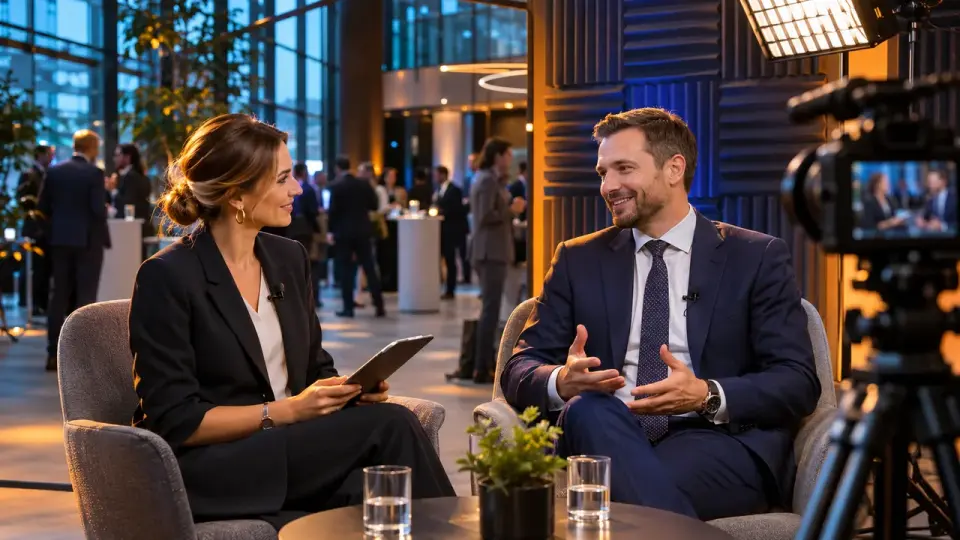
A review studio is a compact recording area with controlled sound and light. The area has its own backdrop and schedule. It is placed near the route of the guests you need, but outside the stage and the coffee break. The producer prepares the interviewee, the interviewer leads the conversation, and the technical team is responsible for recording and backup.
The studio does not have to look like a television set. For a business testimonial, clean sound, a calm backdrop and the ability to get a person in frame quickly matter more. In advance we check ventilation noise, music from the neighbouring hall, slamming doors, reflections in glass and people walking behind the interviewee.
The basic kit includes two cameras or one camera with backup recording, a lavalier and a shotgun microphone, soft lighting, monitoring headphones, a frame monitor and a storage medium for the take. The exact setup depends on the venue and the format. We plan event photo and video coverage together with the power layout, the installation schedule and the handover of source files.
The producer keeps a slot table. The first part lists the interviewee's name, company and the accompanying contact. The second covers the topic of the conversation, the language and any restrictions. Separately, the producer notes the consent status and the time of return to the programme. The exact minutes are set by the team after a test recording at the specific venue.
Who to invite on camera and when to do it?
In short: invite a client who can speak for themselves and understands where the video will be used. The best window does not coincide with their talk, an important meeting or their departure. The invitation is confirmed in advance, and on site the interviewee has the right to decline or narrow the permitted use.
The list of interviewees is put together with the client relationship owners. Sales know the account context, marketing understands the future channels, and the legal team determines the approval format. The organiser must not promise the film crew a specific person until the relationship owner has confirmed the invitation.
We use a short interviewee card:
- role and the correct spelling of name and job title;
- the topic the person is ready to talk about;
- the project or experience that may be mentioned;
- figures and names that require prior confirmation;
- permitted channels and the period of use;
- the person responsible for approving the final version;
- restrictions on footage, logo, captions and transfer to third parties.
It is better to schedule the slot after a content session or a meeting, when the interviewee has fresh context. Recording right at the entrance often produces generic statements. Recording before departure creates a rush. The producer checks the interviewee's schedule and keeps the option of rescheduling without pressure.
Leave a request - let's discuss your task
We'll clarify the event format and suggest the next step.
Interview structure without a memorised promotional script
The interview moves from the client's situation to specific experience and then to the next useful takeaway. The interviewer asks open questions one at a time, asks for context to be expanded, and stops unsubstantiated claims. A ready-made promotional text is acceptable as a reference for the team, but the client is not obliged to repeat it on camera.
Before recording, the interviewee receives the topic, the channel and an approximate list of questions. It is better not to send the full script of answers. A memorised phrase sounds like someone else's, and any deviation makes the person start over. The interviewer keeps to the factual framework and helps the person tell the story in their own words.
A workable sequence of questions:
- Context. What task or situation did your team face?
- Selection criterion. What mattered when choosing an approach or a partner?
- Experience of working together. How did the collaboration go at the key stage?
- Observed change. What became different in your specific case?
- Practical takeaway. What would you advise a colleague with a similar task?
After a general answer, the interviewer asks for an example: "What exactly happened?", "How did that show up in the work?", "Who noticed it?". If the interviewee names a figure, the client is not pushed towards a nice round number. The producer flags the fragment for fact-checking.
It is useful to record a short neutral version of the answer as a separate take. It will come in handy if the long story does not fit into a presentation or an email. The questions and transitions can be included in the event director's script so that the studio does not fall out of the overall scheduling.
Fact-checking before editing saves you from re-shoots
In short: fact-checking starts during the interview, before the edit is finalised. The producer flags names and job titles, product names, dates and figures. Comparisons and cause-and-effect conclusions require separate verification. The owner of each fact verifies the original wording before work begins on graphics and cut versions.
We divide fragments into three groups. Green ones can be edited without additional verification: descriptions of personal experience without disputable details. Yellow ones require confirmation from the client or customer: figures, deadlines, department names, causal links. Red ones do not go into the edit without a separate decision: guarantees, unconfirmed comparisons, third-party confidential information and conclusions about the market.
The table summarises the key points of this section: Level, Example wording, Team action. Use it as a quick reference when preparing an event.
| Level | Example wording | Team action |
|---|---|---|
| Green | “The team helped put together a workable meeting plan” | check the meaning and accuracy of the caption |
| Yellow | “We cut approval down to three days” | request the source and the person confirming it |
| Red | “This solution always doubles sales” | remove or completely rebuild on a verifiable fact |
The fact-check list is attached to the transcript. It contains the timecode and the verbatim phrase. Next to it are the type of check, the source, the owner and the decision. Such a document helps avoid arguing about meaning from memory. The editor can see which segments are already approved and which must not be included even in a rough cut shown to an external team.
Which statements can be kept in the final video?
In short: the final video keeps the hero's words as confirmed by the client for the agreed channels. On-screen text must not amplify the meaning of the answer. The words "best" and "only", promises of results, market comparisons and specific metrics require separate review.
The editor does not "improve" the testimonial on the client's behalf. The edit must not change causality, combine answers to different questions or create a stronger claim. If two phrases produce a new meaning, the edit is sent back for review to the client relationship owner and the approver on the hero's side.
We use an approved wording sheet. For each fragment it lists:
- the approved transcript;
- an acceptable short version for on-screen text;
- the hero's name, job title and company;
- the channels of use;
- the permitted edit versions;
- the approval date and owner;
- restrictions on sharing with partners and use in advertising.
Article 152.1 of the Civil Code of the Russian Federation sets the general rule on using a person's image with their consent and lists the exceptions. Article 10.1 of the Personal Data Law separately governs consent to the dissemination of personal data. For the project this means a simple organisational takeaway: the form and scope of permission must be determined before publication, and disputed cases should be referred to the client's lawyer. A detailed legal analysis remains the domain of a qualified specialist.
Approval without an endless chain of revisions
In short: the client receives a single version for approval, with a transcript, timecodes and a pre-defined scope of the solution. They check the accuracy of their own speech, the captions and the permitted channels. The customer confirms the brand, the facts and the use. One coordinator collects the comments so that the editor does not receive contradictory emails from several participants.
The approval route is designed before filming. It involves the protagonist and the owner of the client relationship. Marketing, the legal team and the editor join according to their own area of review. The lawyer checks the legal boundaries. The editor is responsible for tone, the marketer for the channel. A financial figure is confirmed by the data owner.
The approval package contains a link to a secure viewing, a transcript, a list of captions, a list of channels and a response form. A comment is tied to a timecode. If the meaning changes or a new channel of use is added, the team requests a new confirmation to the required extent.
Important. Participation in an event and consent to being recorded should not automatically be interpreted as permission for any publication. The team records separate decisions on image, personal data and channels of use in a form checked by the customer's lawyer.
Editing, subtitles and versions for different channels
The master version preserves the full approved meaning. Derived versions shorten it without strengthening the points. For each version the team records the frame format and length, then the captions and subtitles. The card also states the channel and the owner. Subtitles are checked against the final audio and terminology after the last editing change.
The same testimonial may be needed in a horizontal presentation, a vertical message from a manager and on a website page. These are different editing tasks. They cannot be produced by simply cropping the frame at the last moment: the composition, caption size, pace and interface safe zone change.
In criterion WCAG 1.2.2, W3C requires captions for prerecorded synchronized media with audio, except where the recording serves as a text alternative and is explicitly labelled as such. For the team this is a good baseline accessibility standard. We prepare subtitles from the final soundtrack, indicate the speaker where necessary and do not hide an important line behind music.
The version matrix may look like this:
The table brings together the key points of the section: Version, Channel, Content. Use it as a quick reference when preparing an event.
| Version | Channel | Content | Check before handover |
|---|---|---|---|
| Master | archive and approval | full approved answer | facts, captions, audio, subtitles |
| Short | email or manager's message | one point and context | meaning not strengthened when shortened |
| Presentation | sales department meeting | answer to a specific objection | source and recording date are clear |
| Public | website or social channel | version within permitted boundaries | channel included in the approval |
The overall plan for releasing materials after the event is covered in the article on content after a conference. Here the task is narrower: to prepare one verified client asset and its permitted versions.
Handing video testimonials over to sales enablement
Sales receives approved files together with application cards. A card names the buyer's question and the relevant segment. It contains an approved quote, a link to the video and the permitted channel. The validity period and the owner are listed separately. The manager understands when a testimonial is appropriate and stays within the agreed boundaries.
In this article, sales enablement means the materials and rules that help sales prepare substantive conversations. A video testimonial gets there only after approval. Draft edits, source files and restricted-access versions stay within the production environment.
The video card includes:
- the case name without confidential details;
- the question or objection the video answers;
- the segment and situation of use;
- a short approved quote;
- a link to the master or an approved copy;
- the channels where the video may be shown;
- the date the content was last checked for relevance;
- the owner of the material and a contact for questions;
- restrictions on editing, downloading or external sharing.
This card is linked to the follow-up after a B2B event process. That way the manager receives the video together with the context of the conversation and the promised next step, instead of sending a single file to all contacts.
We recommend keeping a usage log. It is not needed for total control over managers. The log helps to understand which versions are still current, where the permission period has expired, and which video needs to be withdrawn after a request from the person featured or a change in the facts.
What should you check before wrapping a shoot?
In short: before striking the set, the team checks that files and backups are in place. Then they listen to the audio and verify names and consent status. The producer saves the list of clips for fact-checking and assigns an owner for the next action. It is easier to fix a defect while the interviewee and the team are still on site.
The final acceptance check runs through a checklist:
- both recordings open and sync;
- the audio is clear without professional headphones;
- the name, job title and company are recorded without errors;
- the producer has saved the interviewee's profile and permission status;
- disputed figures and wording are flagged with timecodes;
- the interviewee knows who will send the version for approval and how;
- files are copied to the primary and backup storage;
- access to the source files is limited to the production team;
- sales have not received a draft before fact-checking;
- owners are assigned for transcription, editing, review and handover.
Frequently asked questions
First, marketing and sales choose the goal of the video. For example, to remove doubts about how complex the launch is, to show the experience of working together, or to explain why the client chose a particular way of working. It is better to keep one testimonial focused on one topic. Trying to fit in the company's history, all the product's advantages and thanks to the team turns the answer into an advertising monologue.
The studio does not have to look like a television set. For a business testimonial, clean sound, a calm background and the ability to get a person in front of the camera quickly matter more. We check in advance for ventilation noise, music from the neighbouring hall, doors banging, reflections in glass and people walking behind the interviewee.
The list of interviewees is put together with the client relationship owners. Sales know the account context, marketing understands the future channels, and the legal team determines the approval format. The organiser should not promise the film crew a specific person until the relationship owner has confirmed the invitation.
Before recording, the interviewee receives the topic, the channel and an approximate list of questions. It is better not to send a full script of answers. A memorised phrase sounds like someone else's words, and any deviation makes the person start over. The interviewer keeps the factual framework and helps the person tell the story in their own words.
We divide the clips into three groups. Green ones can be edited without additional checks: descriptions of personal experience without disputed details. Yellow ones require confirmation from the client or customer: figures, timelines, department names, cause and effect. Red ones do not go into editing without a separate decision: guarantees, unconfirmed comparisons, other people's confidential information and conclusions about the market.
The editor does not "improve" the testimonial on the client's behalf. The edit must not change cause and effect, splice together answers to different questions or create a stronger statement. If two phrases produce a new meaning, the edit is sent back for review to the client relationship owner and the interviewee's approver.
At Aventura, we connect the review studio with the venue, the script, the filming, the speakers' schedule and the delivery of finished materials. Request a quote via the form if you want to build this workflow into your B2B event before preparations begin.
Sources
- Civil Code of the Russian Federation, Article 152.1 “Protection of a Citizen's Image”
- Federal Law No. 152-FZ, Article 10.1
- Federal Law “On Advertising”, Article 5
- W3C WCAG 2.2, Success Criterion 1.2.2 Captions (Prerecorded)
Contents
Was this article helpful?