
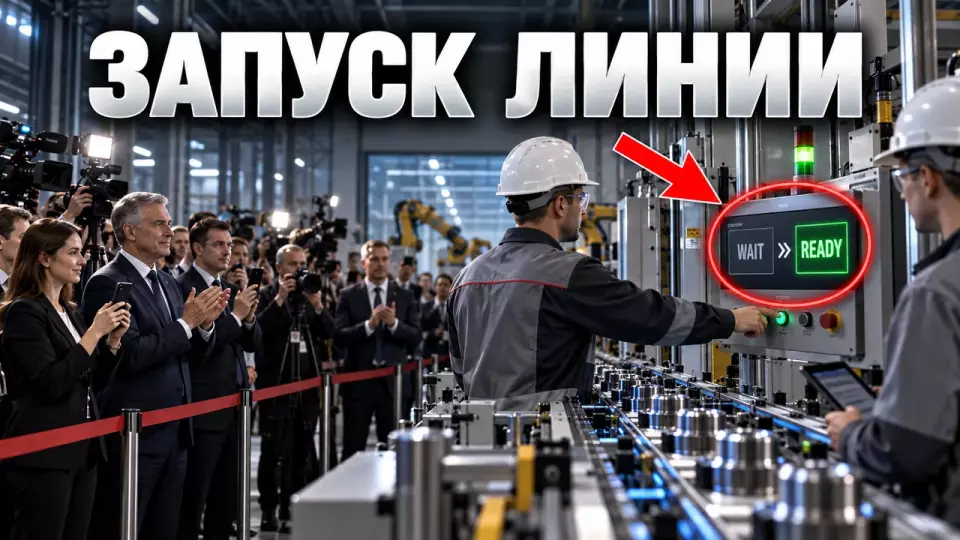
A practical scenario for a production line launch ceremony: technical confirmation, roles, observation point, rehearsal, and backup.
A production line launch ceremony works when guests see a confirmed transition of production to a new status. For this, a stage, speeches, and a symbolic button are not enough. A production specialist confirms readiness, an authorized participant gives an agreed command, the operator performs a standard action, and the audience sees the authorized result. The scenario is built around this chain.
At Aventura, we separate the enterprise's technical decision from the public episode. The directing team does not determine equipment status from the monitor image. It receives a single confirmation from a designated owner and launches only the scenario that was pre-approved by production, safety, protocol, and press service.
We discuss the practice of organizing business and production events in Aventura's Telegram channel. There we publish breakdowns of scenarios and on-site work.
What should a line launch ceremony prove?
The ceremony should give the guest a simple and verifiable answer: what exactly has been launched, what status has been achieved, and what observable sign confirms it. The formulation depends on the actual stage of the project. Dry run, test batch, pilot production, serial production, and design capacity mean different states. They cannot be combined with one ceremonial word "launch".
Official publications about industrial projects clearly show this boundary. Laying the first stone marks the start of construction. Signing the contract fixes the contractual stage.
Starting the line confirms the operation of a specific production circuit. Reaching design capacity may happen later. The host and speakers use only the formula confirmed by the technical manager.
For preparation, we compile a passport of the main episode:
- Name the launch object without advertising exaggeration.
- Record the status as of the ceremony date.
- Indicate the document or official role that confirms the status.
- Describe what guests and cameras are allowed to see.
- Define the symbolic action and its real continuation.
- Write down the stopping condition and a truthful reserve.
If the event covers the opening of the entire enterprise, delegation logistics, and several production zones, it is more useful to start with the article about plant opening: scenario and safety. Here we analyze one narrow episode around a specific line.
Two Loops: Production and Ceremony
The production loop is responsible for the condition of the equipment, access to the operation, and the right to stop the show. The ceremonial loop manages entrances, speeches, the screen, lighting, sound, and filming. They meet at one point: the designated readiness owner passes a brief confirmation to the directing team. Until this signal, the host does not announce the launch and does not invite participants to the symbolic action.
The table summarizes the key points of the section: Loop, Responsibility, What is passed before the episode. Use it as a quick reference when preparing the event.
| Loop | Responsibility | What is passed before the episode |
|---|---|---|
| Production | line condition, safe mode, permissible operation | confirmed status and permission to proceed |
| Occupational safety and health | access boundaries, route, protective equipment, right to stop | zone access and restrictions for guests |
| Protocol | list of participants, order of remarks, official wording | readiness of speakers and agreed order |
| Directing team | commands, screen, sound, light, cameras, transitions | readiness of the public episode and backup |
| Press office | fact sheet, filming, comments, distribution of materials | verified wording and shot list |
Two parallel message threads right before the start create a risk. One employee hears that the line is ready, another knows about a restriction, and the host receives a fragment of a phrase. We appoint in advance the owner of the final confirmation and the backup decision. The other services report to him through the internal chain.
The organizer does not interfere in the technological operation. If the symbolic panel is not connected to the equipment, this is honestly reflected in the script. If the distinguished guest's team is part of the approved procedure, its wording and timing are confirmed by the enterprise.
Who authorizes the central moment?
The authorization is given by an appointed official role on the company side. This person receives confirmations from production, safety, and technical services. In the director's script, the role has one unambiguous line or command. If there is no confirmation, the program switches to a backup without trying to guess the line status from noise, light, or image.
The workflow is as follows:
- Technical services report the status to the designated decision owner.
- The owner confirms readiness or activates the backup procedure.
- The run manager receives one short command in the working channel.
- The host speaks only the agreed public wording.
- Participants perform the ceremonial action.
- The relevant specialist confirms the observed result.
- The director moves the program to the next segment.
The employee's name may change, so the base script records the role, the deputy, and the method of communicating the decision. The public line is written separately from the working signal. Internal discussions about the reasons for delay or technical parameters must not accidentally get on air.
Observation point for guests and cameras
The observation point is chosen before decorating and stage setup. Guests must see the permitted sign of the result, hear the explanation, and not cross the service route. For cameras, angles are chosen in advance that will not include service screens, passes, drawings, and restricted areas. For a person with limited mobility, an equivalent way to see the central episode is required.
We check the point by six questions:
- does the group fit in the permitted zone;
- is the object visible without entering the transport corridor;
- is speech audible against operational noise;
- does the result get into the main and backup frame;
- what information needs to be closed or replaced with a public screen;
- is the route accessible or is an equivalent video display prepared.
The table summarizes the key points of the section: Task, Primary option, Backup. Use it as a quick reference when preparing the event.
| Task | Primary option | Backup |
|---|---|---|
| Show status change | public screen with approved fields | caption and explanation from a technical specialist |
| Show product | permitted sample or visible product output | pre-prepared sample in a safe zone |
| Provide a wide shot | point with the line and participants | camera on a mockup, screen, or demo zone |
| Ensure accessibility | barrier-free route and a viewing spot | multi-camera broadcast to an accessible area |
The production screen is rarely suitable for live broadcast without preparation. It may contain internal parameters, notifications, and data that cannot be published. For guests, a separate screen is displayed: only a clear line status and the data that is allowed to be shown. A technical specialist checks that the simplification does not change the meaning.
How to choose a symbolic action?
A symbolic action should lead to a clear observable result. A button, key, panel, or light signal by itself explains nothing. After the gesture, the audience sees a change in approved status, an authorized part of the process, a product sample, or a brief confirmation from a specialist. If there is no direct connection with the equipment, the scenario does not present it as a technical command.
First, the team defines the observable result, and then selects the props:
- Determine which fact can be publicly confirmed.
- Choose a safe indicator that is visible from the guest area.
- Verify the action with production and security.
- Coordinate the host's line and the specialist's response.
- Make sure the cameras see the continuation, not just hands at the panel.
- Prepare a backup option without a live action.
A conventional "red button" may be appropriate as a stage symbol, but it should not mislead. In one project, the panel may transmit a real authorized command. In another, it only triggers lights and screen. These scenarios require different wording.
Speeches also follow the observable fact. The company head states the achieved status. The technical specialist explains the change.
A regional representative or the client speaks about the effect for their area of responsibility. Repeated reference materials go into press materials.
Cue-to-cue for the main moment
Cue-to-cue breaks down the central episode by commands without a full run-through of the entire event. The team checks the trigger, working signal, participants' entrance, symbolic action, screen, sound, cameras, result confirmation, and transition. The real technological launch is not repeated for the sake of rehearsal. It is replaced by an acceptable test of interfaces and an agreed simulation of signals.
The table summarizes the key points of the section: Cue field, What to record, Readiness criterion. Use it as a quick reference when preparing the event.
| Cue field | What to record | Readiness criterion |
|---|---|---|
| Trigger | who confirms readiness and with what phrase | single source, unambiguous phrase |
| Working command | what the director's group receives | command is audible and does not go on air |
| Entrance | where participants come from and where they stop | route is clear, marks are clear |
| Action | what each participant does | no interference with dangerous operation |
| Screen and sound | what the audience sees and hears | status is readable, line is intelligible |
| Confirmation | who announces the result | wording matches the fact sheet |
| Completion | next speaker or route | no pause and no oncoming flows |
| Reserve | what replaces an unavailable display | reserve is truthful and ready for immediate activation |
The run-through is conducted in conditions close to the event: with working radio channels, screen, microphones, cameras, and key participants. After a note, it is not enough to mark "fixed". The team repeats the same fragment and checks the result. We have covered the full procedure in the article about technical rehearsal of the event.
The final version of the cue list should be short. It contains no history of discussions or old versions. On site, everyone sees only their own commands and control points, while the run-through leader holds the full sequence.
What to do if the line is unavailable?
If the line cannot be shown, the host honestly reports its current status and moves on to a pre-prepared backup episode. The host does not explain the reasons on their own and does not present a recording as a live broadcast. An authorized representative of the company gives an agreed-upon statement, after which the audience sees an approved video, mockup, sample, engineer's explanation, or the next business segment.
The backup is chosen in advance based on the level of availability:
The table summarizes the key points of the section: Situation, What can be done, What not to say. Use it as a quick reference when preparing for the event.
| Situation | What can be done | What not to say |
|---|---|---|
| Live broadcast delayed | change the order of speeches and move to questions | "the line is already working" if the status is not confirmed |
| Area temporarily closed | show a public screen, mockup, or sample | disclose the internal reason without permission |
| No video signal | provide a specialist's explanation and play an approved recording | present the recording as the current process |
| Project status changed | rename the episode and announce the next confirmed stage | keep the old wording for the sake of the poster |
We prepare the backup together with the main scenario. The video's date, captions, and rights have been checked. The sample is available for the camera.
The speaker knows a brief statement. The next segment can be started without restructuring guest flows. Such a plan B reduces pressure on production and does not turn a technical pause into a public dispute.
For a complex project, a separate anti-crisis event plan is needed. It includes guest communication, transport, access changes, medical and weather scenarios. In the article about the line launch, we only include the backup for the central episode.
Program before and after launch
A short program guides the guest from access to a clear fact, and then to the next business action. Before the central episode, only context, rules, and the audience's readiness to see the result are needed. After it, the flows separate: the press receives questions and materials, partners move to the product or negotiations, employees hear the team's role, honored guests follow protocol.
Workflow without universal minutes:
- Registration and access confirmation.
- Issuance of necessary protective equipment and brief briefing.
- Transfer to the guest area along an approved route.
- Brief context from the enterprise manager.
- Technical explanation of the facility and the observed result.
- Internal readiness confirmation.
- Central ceremonial episode.
- Result confirmation by a specialized specialist.
- Separation of flows into press, business part, and permitted viewing.
- Organized completion and distribution of materials.
Registration collects only data necessary for actual access. One up-to-date list, a separate exceptions flow, and a backup entrance help avoid moving the dispute about access to the line itself. Detailed route is in the article about participant registration.
After the launch, the photo session should not delay the regular work of the shift. For a general shot, choose a safe point and predefine the composition of groups. The press receives a fact sheet, permitted images, and a contact for clarifications. Closed parameters, work screens, and personal data are not included in the material package.
Safety, filming and accessibility
Safety sets the boundaries of the scenario rather than shaping it after approval. Temporary stage, lighting, cables, stands, and guest seating do not block aisles and evacuation routes. The facility owner determines the route, protective equipment, permissible capacity of the area, and the right to stop the visit. A public scenario does not replace production instructions, training, and access clearance.
The memo of the Main Directorate of the Ministry of Emergency Situations of Russia for the Pskov Region for cultural and mass events states that the event organizers or the authorities that authorized it are responsible for ensuring safety. The same memo requires not cluttering evacuation passages, exits, corridors, vestibules, and staircases. For an industrial facility, the enterprise's local rules and decisions of specialized services are added to these general requirements. We include their representatives in the headquarters before developing the layout.
The filming map is approved before the rehearsal. It marks permitted shots, restricted areas, public screen, individuals and objects requiring separate approval. Article 152.1 of the Civil Code establishes the general rule of consent for the publication and further use of a citizen's image and lists exceptions. A close-up portrait of an employee, an interview, or an advertising mock-up is better planned together with verification of the legal basis for use.
Accessibility is checked along the entire route: drop-off, entrance, protective equipment, doors, level differences, restroom, visibility, and evacuation. If the production area is inaccessible or dangerous for some guests, an equivalent option includes multi-camera display, subtitles, text materials, and a sample in an accessible area. WCAG 2.2 criterion 1.2.4 requires subtitles for all live audio content in synchronized media.
What to include in the budget and brief?
The estimate depends on the venue, guest program, protocol, number of streams, equipment, broadcast, access requirements, and volume of post-event materials. We first gather the scenario outline and constraints, then calculate the team and equipment. The same stage may require a different budget if in one case a guest zone is sufficient, while in another broadcast, simultaneous interpretation, a public screen, and complex accreditation are needed.
At the first brief, we need answers:
- What does the company consider the launch on the event date?
- Who confirms this status and who has the right to stop the episode?
- What operation or result can be shown to guests?
- Which parameters, screens, and areas are allowed to be filmed?
- Who participates in the public action and what are the speakers' roles?
- Where is the observation point located and how do guests access it?
- What option is provided for remote and accessible audiences?
- What happens if the line is unavailable?
- What materials do the media, partners, and employees receive?
- Who approves the final versions of the scenario, facts, and footage?
After the brief, we prepare a roles map, program, guest zone layout, cue sheet, filming map, technical specification, reserve, and estimate. Figures on capacity, investments, and jobs go into speeches only after client verification. The scenario helps to accurately and safely present a confirmed production fact.
Frequently Asked Questions
The ceremony should give the guest a simple and verifiable answer: what exactly has been launched, what status has been achieved, and what observable sign confirms it. The wording depends on the actual project stage. Dry run, test batch, pilot operation, serial production, and design capacity mean different states. They cannot be lumped together with a single ceremonial word 'launch'.
The production circuit is responsible for the state of the equipment, clearance for the operation, and the right to stop the demonstration. The ceremonial circuit manages entrances, speeches, screen, light, sound, and filming. They meet at one point: the designated readiness owner gives a short confirmation to the directing team. Until that signal, the presenter does not announce the launch and does not invite participants to the symbolic action.
Permission is given by a designated official role from the enterprise. This person receives confirmations from production, safety, and technical services. In the directing script, the role has one unambiguous line or command. If there is no confirmation, the program switches to the backup without trying to guess the line's condition from noise, light, or image.
The observation point is chosen before the decor and stage layout. Guests should see the permitted sign of the result, hear the explanation, and not cross the service route. For cameras, angles are chosen in advance so that service screens, passes, drawings, and restricted areas are not in frame. For a person with limited mobility, an equivalent way to see the central episode is needed.
The symbolic action should lead to a clear observable result. A button, key, panel, or light signal by themselves explain nothing. After the gesture, the audience sees a change in the approved status, a permitted fragment of the process, a product sample, or a short confirmation from a specialist. If there is no direct connection to the equipment, the script does not present it as a technical command.
Cue-to-cue breaks down the central episode by commands without a full run-through of the entire event. The team checks the trigger, working signal, entrance of participants, symbolic action, screen, sound, cameras, confirmation of result, and transition. The real technological start is not repeated for the sake of rehearsal. It is replaced with a permissible test of interfaces and an agreed imitation of signals.
Sources
- IEK GROUP: launch of new production in Kaluga Region
- Russian Emergencies Ministry: fire safety during mass events
- Civil Code of the Russian Federation, Article 152.1 'Protection of a citizen's image'
- W3C: explanation of the Captions (Live) criterion
- W3C: WCAG 2.2, criterion 1.2.4 Captions (Live)
- Rospotrebnadzor: guidelines for organizers of mass events
Contents
Was this article helpful?


