A practical process for freezing presentations: deadline, master version, change log, exceptions and handing the file over to the playback system.
A few hours are left before the conference. The chat holds the files final, final_2 and definitely_final, while yet another version is open on the playback computer. At this point the problem is no longer slide design. The team has lost a single source of truth and cannot prove which file passed the check.
At Aventura we solve this with presentation freezing. After it, one version becomes the working one for production. A new edit goes through a separate decision and a repeat test, so important corrections remain possible. This order protects the programme, the stage, translation, subtitles and recording from a file being quietly swapped.
If the conference is already in the plan, request a quote for conference organisation. We will link speaker preparation with the programme, technical production and the team's work on site.
What does freezing presentations mean?
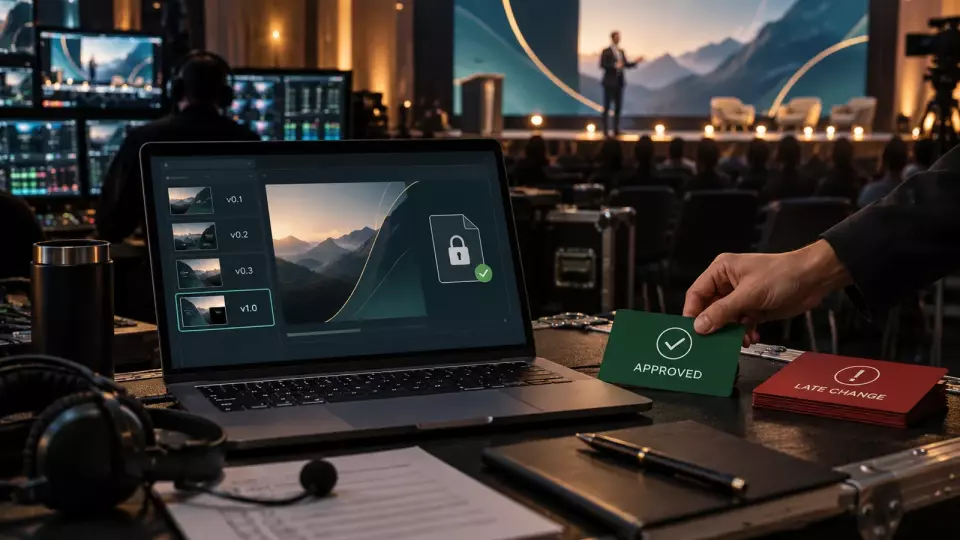
Freezing presentations means locking a specific file as the master version for the show. The team records its number, acceptance time, owner and the result of the technical check. After this point, a new file does not automatically replace the master copy, even if the speaker themselves sends it.
The freeze has a practical purpose: to separate working material from drafts. The editor can discuss wording, the designer can adjust the grid, and the speaker can keep a personal copy. Production needs one file that can be opened, checked, loaded into the playlist and restored from backup.
We explain to participants in advance that the word "freeze" does not mean pointless rigidity. A factual error or an important change can be corrected. But the team must see the cost of the edit and decide whether it can repeat the affected checks in time.
For a large programme, this process is part of conference management. It is linked to the run of show, moderators, interpreting, recording and the stage plan. A separate folder of slides without these connections does not produce a manageable result.
Two lock-in points instead of a single "final"
A single deadline mixes different tasks. We separate content lock-in from technical file lock-in. First, the owners confirm the meaning, facts and acceptability of the material. Then production accepts a specific version and tests it in the applicable environment.
Content lock-in answers the question: can the talk be considered approved in terms of meaning? At this point, the topic, key message, figures, product names, employer restrictions, third-party materials and the permitted level of disclosure are confirmed.
Technical lock-in answers a different question: can this file be shown using the chosen setup? What matters here is the frame format, fonts, animation, video, audio, links, demo, clicker and backup.
Between the two points, there may still be a window for design and technical assembly. After the first, facts cannot be changed unnoticed. After the second, the file cannot be quietly swapped. If a change affects both areas, it goes back to both owners.
This order does not duplicate the conference speaker office. The speaker office manages the entire journey of the person and the talk. Freezing the presentation is a narrow production gate within that journey.
How to set a deadline for a speaker's presentation?
The deadline is calculated backwards from the final mandatory review. The team lists the actions between receiving the file and going on stage, estimates the scope of the programme and leaves time to fix any defects found.
A universal deadline like "three days before" does not work for every project. One talk consists of simple slides. Another includes non-standard fonts, videos, a live demo, simultaneous interpretation and screen recording. The same date will create a different level of risk.
We build a chain of gates:
- The speaker submits the working version via the agreed channel.
- The content owner confirms the applicable revision.
- The coordinator assigns a version number and saves the master copy.
- The technical team opens the file on the target or a comparable system.
- Comments are returned to the owners with precise closure criteria.
- The corrected version gets a new number.
- The affected tests are repeated.
- The confirmed file is uploaded to the playback system and the backup.
If the programme has many speakers, deadlines are staggered in waves. There is no need to accept all files at the same hour. It is more useful to link the sequence to halls, languages, complexity of demos and the availability of the technical team.
A deadline without a consequence remains a request. The rules must state what happens in case of delay: a shortened review, switching to PDF, dropping a complex demo or a separate decision by the production manager. The consequence is chosen for the project, not used as a punishment.
We publish working breakdowns of programme and venue preparation in the Aventura Telegram channel. For a specific conference, the rules, files and statuses must remain within the project's closed loop.
Master version and change log
The master version is defined by an entry in the register: session ID, version number, date, owner, review status and upload location. The word final in a file name does not create that status.
A simple naming scheme will do:
hall-session_speaker_v04_2026-10-07.pptxThe name helps a person, but it does not replace the log. In the log we record:
The table brings together the key points of this section: Field, What to record. Use it as a quick reference when preparing an event.
| Field | What to record |
|---|---|
| Session | hall, time, short programme ID |
| File | name, format, size and version control mark |
| Owner | who requested the change and who approved it |
| Change | which slides or embedded objects are affected |
| Impact | timing, interpretation, subtitles, video, sound, recording, moderator |
| Check | who opened the file and where, what was tested |
| Status | draft, in review, approved, replaced, archived |
| Placement | primary playback system and backup copy |
Old versions are not deleted in haste. They are moved to the archive and clearly marked as not for use. This helps restore the previous master copy if a new edit breaks the playback or was released by mistake.
Access to replace the master file is restricted. A speaker can upload a new version, an editor can leave a comment, a designer can assemble the file. But the status "approved for playback" is changed by the designated owner after confirmation from the technical team.
This approach is especially important when a business event is run by several teams. A shared folder without roles and statuses quickly turns into a repository of equally convincing "finals".
What to check before releasing the file?
Before releasing the master version, its reproducibility in the chosen display setup is checked. The file is opened on the target computer or in the closest possible environment. A message saying "it works on my machine" is not enough.
The minimum technical check includes:
- the file format and the ability to open it without recovery;
- aspect ratio and safe margins for the screen;
- the presence and embedding of non-standard fonts;
- line breaks, symbols, formulas and diagrams;
- animation, transitions and the order in which objects appear;
- local video files, codecs, sound and volume level;
- links and internet dependencies;
- demonstration of programs, websites and remote systems;
- speaker notes and hidden slides;
- the first and last frame;
- the clicker, confidence monitor and timer;
- a backup copy in a suitable format.
PDF is useful as a backup for simple slides, but it does not preserve animation, embedded video or the logic of a complex demonstration. Therefore, an export cannot be considered a full replacement for the source file. The team decides in advance what will remain in the backup scenario.
Accessibility requirements are also checked before release. Unique slide titles, reading order, contrast, alternative text and subtitles are hard to fix a minute before going live. W3C and Microsoft recommend preparing accessible materials in advance rather than postponing this work until the recording is published.
If the presentation affects lighting, sound, video or stage cues, we link it to equipment rental and the technical scenario. A single embedded video can change sound routing and the operator's actions.
Late Edits as a Controlled Exception
A late edit follows a short decision path. The author explains what changed and why; the coordinator identifies the affected dependencies; the authorized owner makes the decision; the technical team reruns the necessary tests. Only after that does the new version replace the master file.
We do not assess an exception by file size or the number of changed slides. A single figure on an ordinary slide may not affect production. Replacing a link with a live demo can change the internet, backup, timing and recording. What matters is the impact, not the size of the edit.
The late change path:
- Log the request and preserve the current master version.
- State the reason, affected slides and urgency.
- Check the impact on content and rights.
- Check the impact on the technical setup.
- Assign a decision owner and a response deadline.
- If approved, release a new version with a new number.
- Rerun the affected checks.
- Update the playlist, backup and status in the register.
- Pass a single final status to the stage and the moderator.
An edit is considered closed after a retest. The phrase “I just replaced the text” is not a check. If there is no time for a test, the production manager must see this limitation and choose a safe option: keep the master copy, use a PDF, or drop the risky element.
Translation, subtitles and recording depend on the version
A presentation often does more than just appear on screen. It is received by translators, subtitle specialists, the broadcast director, the recording operator, the moderator and the post-production team. A late change can throw all these roles out of sync.
For a multilingual conference, terminology, names, abbreviations and the order of talking points all matter. The translator prepares a glossary based on the material received. If the speaker changes product names or figures after the freeze, the coordinator must pass the change to the language team and obtain confirmation.
Subtitles and graphic design depend on the topic, job title, organisation names and script points. Recording depends on which slides are cleared, screen sharing and restricted objects. The moderator builds questions around the declared content.
That is why the change log contains more than just the file. It includes a list of affected roles and a note confirming handover. A single message in a group chat does not prove that the translator, director and operator all received the same decision.
If a new version cannot make it through all dependent workflows in time, the outcome can be split. For example, show the corrected slide in the room, but separately agree whether it will appear in the recording and publication. Such a decision is recorded before the event, rather than reconstructed from messages afterwards.
How do you hand a file over to the presentation system?
Handing over to the presentation system is a separate operation, not just copying to a shared folder. The technician checks the session ID, speaker name, version number and test result, then uploads the file to the correct room and slot. After upload, the status changes in the register.
For centralised presentation we check:
- whether the version in the register matches the one on the presentation computer;
- whether the file is linked to the correct session and room;
- whether the first frame opens without service windows;
- whether videos, sound and the clicker work;
- whether notifications and updates are disabled;
- whether there is a local copy and a separate backup;
- whether the operator knows what to do in case of failure.
The speaker's personal laptop does not override the freeze. The team records the device configuration, adapters, resolution, power, screen mode, notifications, internet and backup file. The mere fact that the speaker brought a laptop does not prove the signal is ready.
A speaker preparation room or its functional equivalent is needed for the final check. Here the approved version is opened, changes are verified and the person is handed over to the stage coordinator. Official SLAC/Stanford recommendations also describe pre-checking materials on systems comparable to the equipment in the auditorium.
This operation is related to the technical rehearsal of the event, but does not replace it. The rehearsal checks the entire route and interaction between departments. Handing over the master file confirms the specific material for a specific talk.
Conference Day Plan
On the day of the conference, the team does not start the process over. It checks the already approved master version, logs exceptions and maintains a single decision channel. All parallel requests are routed to the designated coordinator.
In the morning we check storage availability, each hall's playlist and backups. Then we verify the changes that were approved after the last technical run-through. Each such file must have a new number and a record of retesting.
Before the speaker goes on, the coordinator confirms a short status: session, version, display scheme, availability of the demo and open constraints. The stage does not need the entire message thread. It needs one verifiable answer.
If a new file arrives, it is not put into the show by default. The request goes through the event control room. There they assess time, impact and backup. The decision is returned simultaneously to the speaker's coordinator, the technical team and the director.
In the event of a failure, the operator first uses a pre-tested backup. This may be the previous master version, a PDF, a local recording of the demo or a script without video. The backup is chosen before the event and tested in the part where it is planned to be used.
Presentation Readiness Checklist
A presentation is ready when the team can name one working version, show a test record and restore the file from backup. A promise to send a fix or a message saying "it seems to open" leaves the status open.
Before releasing it into the show, check:
- content is confirmed by the applicable owners;
- the file name matches the approved scheme;
- the version number is recorded in the registry;
- the master copy is in a single storage location;
- the file has been opened on the target or a comparable system;
- fonts, video, sound and animation have been checked;
- demos and internet dependencies have a backup;
- accessibility has been checked before final handover;
- late changes are logged;
- affected tests have been repeated;
- the version is uploaded to the correct hall and slot;
- the primary and backup copies match the status;
- interpreters, captions, recording and the moderator have received the applicable changes;
- the operator knows the action to take in the event of a failure;
- the stage has received one final status.
A freeze does not promise a conference without failures. It removes the uncertainty the team creates itself: multiple final files, hidden substitutions and decisions without an owner. The client sees not the number of messages, but the production readiness of each talk.
Frequently Asked Questions
Freezing presentations means locking a specific file as the master version for the show. The team records its number, acceptance time, owner and the result of the technical check. After this point, a new file does not automatically replace the master copy, even if the speaker themselves sends it.
A single deadline mixes different tasks. We separate content lock-in from technical file lock-in. First, the owners confirm the meaning, facts and acceptability of the material. Then production accepts a specific version and tests it in the applicable environment.
The deadline is calculated backwards from the last mandatory check. The team lists the actions between receiving the file and going on stage, estimates the scope of the programme and leaves time to fix any defects found.
The master version is defined by an entry in the register: session ID, version number, date, owner, check status and upload location. The word final in a file name does not create such a status.
Before the master version is released, its reproducibility in the chosen show setup is checked. The file is opened on the target computer or in the closest possible environment. A message saying "it works on my machine" is not enough.
A late edit goes through a short decision path. The author explains what changed and why; the coordinator identifies the affected dependencies; the authorised owner makes the decision; the technical team repeats the necessary tests. Only after that does the new version replace the master file.
If you need to link presentation preparation with the programme, the stage and technical production, request a quote for organising a conference. We will break down the deadlines, roles, checks, exceptions and the team's work on the day of the event.
Sources
- SLAC/Stanford NAPAC 25 Speaker Preparation Guidelines
- USENIX Instructions for Presenters
- Microsoft: Make your PowerPoint presentations accessible
- Microsoft: Benefits of embedding custom fonts
- Google Docs Editors Help: Find what's changed in a file
- LibreOffice Help: Export Directly as PDF
- W3C WAI: Making Events Accessible
- NIST SP 800-128: Security-Focused Configuration Management
- Apple Support: Export Keynote presentations
Contents
Was this article helpful?