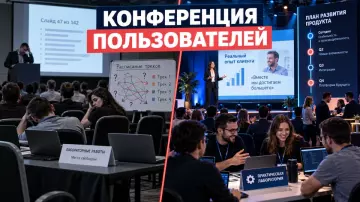
A hybrid conference for branches requires two equal participation tracks. We break down the program, broadcast, accessibility, KPIs, and preparing a plan B.
At Aventura, we analyze the organization of business events: from the program to working with contractors.
Why do branches need a hybrid conference?
In short: A hybrid conference for branches is needed when it is important for the company to maintain a common business program and connect employees from different cities. It works only with two pre-designed tracks: in-person and remote. Participants should receive equally clear access to key messages, questions to speakers, and final materials.
Branches rarely live on the same calendar and in the same time zone. For part of the team, traveling to a conference takes too much time. A hybrid format can reduce the need for travel, but it adds work for the director, moderator, and technical team.
First, we fix the goal. This could be a strategy launch, training, a partner meeting, or synchronization of managers. Then we decide which parts of the program require presence in the hall, and which work equally well on air.
We wrote more about the basic preparation of a business event in the article “Recommendations for organizing a conference”.
Two participant journeys
In short: the in-person guest goes through registration, entry, the on-site programme and live meetings. The remote participant gets a separate connection page, a connection test, clear programme navigation and the chance to ask questions. A shared content core links the journeys, while the details of interaction for each group are planned separately.
For the in-person guest, wayfinding around the venue, sound in the hall, question spots and breaks matter. For the remote participant, a stable stream, a close-up of the speaker, slides without small text and someone responsible for the chat matter.
We map the participant journey into a table and check every point before the rehearsal.
The table brings together the key points of this section: Stage, In-person participant, Remote participant. Use it as a quick reference when preparing your event.
| Stage | In-person participant | Remote participant |
|---|---|---|
| Before the event | invitation, registration, venue map | invitation, registration, connection test |
| Start | check-in and welcome | joining the stream and sound check |
| Programme | stage, hall, questions | director's feed, slides, chat |
| Break | networking and wayfinding | a separate online activity or a pause |
| After | materials and meetings | recording, transcript and materials |
The existing article on online events is useful for choosing a platform. In this article we add the in-person journey and a shared measurement system to it.
How to build a business program?
In short: A hybrid conference program is built around a single goal, not around the number of presentations. Each block specifies in advance how the two audiences participate, who asks questions, and what result is recorded. Pauses are needed between content blocks so that the remote stream does not turn into continuous viewing.
We start with the message that participants should take away. After that, we break the program down into plenary blocks, working sessions, and time for questions.
- Identify one main message of the conference and two or three supporting points.
- For each presentation, assign a format: report, conversation, case study, or workshop.
- Write down separate question mechanics for the room and for the online chat.
- Rehearse the transitions between the stage, the presentation, and remote connections.
- End the conference with a list of decisions, owners, and next deadlines.
In the technical brief for a forum we recommend fixing the roles and result of each block in advance. For a hybrid format, an online stream owner is added to them.
How to build a technical setup without unnecessary equipment?
In short: A hybrid conference needs to ensure clear sound, a comprehensible shot, transmission of presentations, and a backup communication channel. The number of cameras and devices depends on the stage and the program. We first describe the shots and signals the viewer needs, and then select equipment for the task and the venue.
A remote participant must see the speaker's face, the slides, and important actions on the stage. A single fixed camera may not cover all three tasks at once. The technical plan should be tested at the actual venue before setup.
Minimum list for the brief:
- microphones for speakers and the host;
- a wide shot camera and a close-up camera;
- output of presentations to the stream;
- a separate communication channel with remote participants;
- recording of the stream;
- a backup laptop, cables, and an internet channel.
WHO in its recommendations for hybrid events specifically points to technical preparation, registration, moderation, and time control. We transfer this principle into the working scheme: each element has a person responsible and a backup.
Subscribe to the Telegram channel, to receive new practical materials.
How to engage online participants?
The essence: Online participation starts before the broadcast. We collect questions during registration, provide a clear way to ask them during the program, and assign a chat moderator. After the conference, the remote participant receives the materials and the recording. This way, the broadcast becomes part of the event, not a passive video link.
Collect questions in advance and group them by topic. The host can address branches by name if the format and participants' consents allow it. For work sessions, use short polls or a question form.
Do not mix all messages into one stream. A question from the room, a message from technical support, and a moderator's comment should be distinguished. This simplifies the host's work and reduces the risk of missing an important request.
Registration and accessibility
Answer: Registration should immediately distinguish between in-person and remote participation and ask about necessary access conditions. For the broadcast, readable slides, subtitles, a transcript, and an accessible media player are needed. Testing takes place before the broadcast, not after a participant complains.
In the registration form, we add a field for the participation format and a question about accessibility needs. The organizer passes this data in advance to the venue, the technical team, and the moderator.
W3C describes four principles of accessible web content: perceivability, operability, understandability, and robustness. For media, W3C points to subtitles, transcripts, and an accessible player. In practice, this means the following:
- Check the contrast and text size of presentations.
- Prepare subtitles or live captioning for the broadcast.
- Save the recording and transcript after the event.
- Check keyboard navigation through registration and the player.
The UK government's recommendations for accessible online events advise surveying the audience in advance and testing features before the live broadcast.
Safety and Plan B
In short: Plan B describes specific actions in case of a speaker, connection, venue or transport failure. We assign responsible persons, backup contacts and the procedure for notifying participants. Safety requirements depend on the facility and applicable regulations, so we coordinate the technical plan with the venue administration.
For the in-person part, check entry and exit routes, capacity, alert systems and staff procedures. For the online part, check backup internet, local signal recording and the communication channel with the host.
The table summarizes the key points of the section: Failure, First action, Who is responsible. Use it as a quick reference when preparing the event.
| Failure | First action | Who is responsible |
|---|---|---|
| Speaker doesn't show up | switch to the backup block | program producer |
| Sound is lost | switch to the backup microphone | technical director |
| Broadcast interrupted | give participants a backup link | online stream moderator |
| Venue closed | activate the remote program and notify guests | project manager |
For in-person streams, we coordinate the plan with the venue administration and applicable requirements. The MChS methodological recommendations for mass events can be used as a reference for such a check.
How to measure the results of a conference?
At the start: The report separates registration, attendance, activity, and completed actions for two audiences. We agree on several metrics with management in advance, and after the event we combine data from registration, broadcast, questions, and follow-up. Views alone do not show whether the conference goal has been achieved.
In the article about KPIs of a corporate event we discuss the general logic of evaluation. For a hybrid conference, we add a breakdown by participation format.
The table contains the key points of the section: Indicator group, In-person stream, Online stream. Use it as a quick reference when preparing the event.
| Indicator group | In-person stream | Online stream |
|---|---|---|
| Reach | registered and attended | registered and joined the broadcast |
| Participation | questions, meetings, work in sessions | questions in chat, polls, viewing time |
| Content | attendance of relevant blocks | viewing of relevant blocks and recording |
| Next step | agreements after meetings | forwarded questions and tasks |
The reporting deadline is best determined before the event. For example, immediately after the conference, technical indicators and attendance are recorded, and later - the completion of agreed tasks. The specific deadline is chosen by the client together with the process owners.
What to Provide to the Agency
In short: A good brief describes the goal, branches, audiences, dates, program, accessibility requirements, venue, online platform and reporting format. We use this data to build a concept, assign roles and prepare a comparable estimate without guesswork during the project.
Before meeting with us, gather nine blocks:
- The goal of the conference and the decision participants should make.
- A list of branches and the estimated number of in-person and remote guests.
- Cities, time zones and date constraints.
- A draft program and list of speakers.
- Requirements for recording, subtitles, transcription and storage of materials.
- Details about the venue, internet, stage and accessibility.
- Rules for handling questions, photography and video recording.
- Planned report metrics.
- The procedure for approving changes and the responsible people on the client side.
Frequently Asked Questions
Branches rarely live on the same calendar and in the same time zone. For part of the team, traveling to a conference takes too much time. A hybrid format can reduce the need for travel, but it adds work for the director, moderator and technical team.
For an in-person guest, wayfinding at the venue, sound in the hall, places for questions and breaks matter. For a remote participant, stable streaming, a close-up of the speaker, slides without small text and someone responsible for chat matter.
We start with the message participants should take away. After that, we break the program into plenary blocks, working sessions and time for questions.
A remote participant should see the speaker's face, slides and important actions on stage. One fixed camera may not cover all three tasks at once. The technical plan should be tested at the actual venue before installation.
Collect questions in advance and group them by topic. The host can address branches by name if the format and participant consents allow. For working sessions, use short polls or a question form.
In the registration form, we add a field for the participation format and a question about accessibility needs. The organizer passes this data in advance to the venue, technical team and moderator.
At Aventura, we start with this brief and then bring together the script, technical team, venue and on-site control. Request a Quote for a Hybrid Conference
Sources
- W3C Web Content Accessibility Guidelines
- W3C Media Accessibility
- UK Government: accessible and inclusive online events
- WHO: guidelines for hybrid side events
- EMERCOM of Russia: methodological recommendations for mass events
Contents
Was this article helpful?