A practical framework for a corporate learning fair: a program map, skill stations, employee routes, and the next step after the event.
A corporate learning fair helps employees choose a suitable way to develop for a work task. In one place, they can compare programs, try a short exercise, ask an expert a question, and commit to a follow-up. The event works if the learning catalog is turned into clear routes, and each zone has a specific next step.
At Aventura, we begin such preparation not with a list of speakers and booth design. First, we find out what tasks participants will come with, what opportunities the company is ready to offer, and who is responsible after the fair. Then we connect the content with the space, registration, flows, technology, and the overall direction of the day.
What is a corporate learning fair?
In short: This is an internal event where an employee sees several educational opportunities, compares them by common rules, tries certain activities, and chooses what to continue with. The participant's decision becomes central: which skill they need, which format suits them, what they are ready to do after a short trial, and who will help them take the next step.
The fair can bring together internal courses, mentoring, professional communities, knowledge libraries, project assignments, expert consultations, and career tracks. But the number of options alone does not create value. If each program owner designs their booth differently, the employee sees a set of names that are hard to compare.
The format differs from similar events by the participant's main action.
The table summarizes the key points of the section: Format, What is at the center, Participant's result. Use it as a quick guide when preparing the event.
| Format | What is at the center | Participant's result |
|---|---|---|
| Conference of internal experts | reports, discussions, and knowledge sharing | understood the topic, received materials, asked a question |
| Forum of internal trainers | practices of leading trainers, methodologies, and feedback | improved the way they train colleagues |
| Internal job fair | roles, projects, and the transition process | chose a career conversation or HR step |
| Learning fair | ways to develop a skill for a work task | chose a program, practice, mentor, or material |
We discuss the preparation of authors and practical sessions separately in the article about the forum of internal trainers. The mechanics of the opportunity map can be supplemented with the approach from the internal job fair. In the new program, these elements serve a different goal: to help the employee make a conscious choice about learning.
Official corporate examples show that a learning festival can combine in-person and online activities, independent assignments, discussions, short meetings, and on-the-job learning. This is not a ready-made template for every company. The set of formats depends on the objectives, audience, available programs, and further support.
Event outcome and the limits of promises
A realistic outcome of the fair is visible in the chosen action, not in a general promise to develop a learning culture. A participant can take a short tryout, receive feedback, sign up for a program, choose a mentor or save the material. Mastering a skill, changing work behavior and a career decision require time, practice and a separate assessment after the event.
Before the announcement we write one working phrase: “After the fair, an employee will be able to...” A good continuation describes an observable action. For example, compare two development paths, choose a program for the current task, sign up for a consultation or receive an assignment for independent practice.
A weak goal sounds broad: “increase engagement in learning.” It does not suggest what to design at the venue and what to count after the event. Attendance, interest in the zone and course enrollment can be measured. Skill growth or performance improvement cannot honestly be attributed to a single day without further observation.
It is useful to divide four levels of outcome:
- Reach. Which departments, roles and branches got access to the fair.
- On-site action. What the participant tried, what question they asked and what feedback they received.
- Chosen continuation. What they signed up for, what material they saved, with whom they agreed to talk.
- Transfer to work. What they applied later and what conditions helped or hindered.
At the briefing we first find out for which work task training is needed. Then we check whether the gap is really related to a lack of knowledge or skills. Sometimes a person already knows what to do, but equipment, process, time or rules get in the way. Then a new program will not eliminate the original problem. We ask the business owners to honestly indicate where the fair offers training and where a different management step is needed.
We also do not confuse a short tryout with diagnostics. A few minutes at a station help to understand the format, get a first observation and decide whether it is worth continuing. They do not provide sufficient grounds for a professional opinion, public rating or promotion decision.
A Map of Learning Opportunities
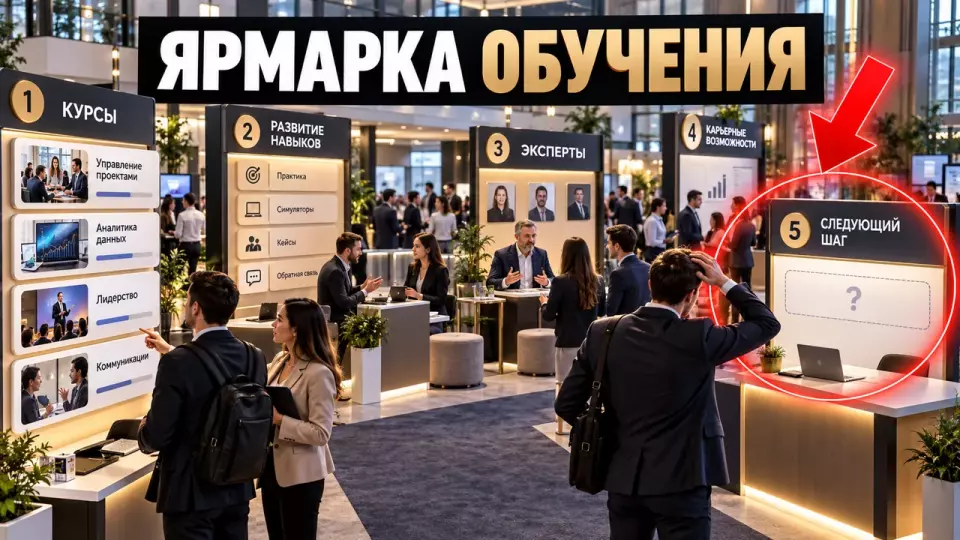
The map translates the internal catalogue from the language of course titles into the language of work tasks. Every opportunity gets the same card: who it is created for, which skill or action it develops, what is required to start, how the learning runs, and which step becomes available after the fair. This lets an employee compare routes rather than the promotional wording of different departments.
Starting with a list of courses is convenient for the organisers, but not for the participant. Employees usually arrive with a practical task: learning to give feedback, mastering a new tool, preparing for a managerial role, working better with data, or getting to grips with a production process.
So the team first builds a map of tasks and audiences. Programme owners then link courses, practice sessions, communities and consultations to it. A single opportunity can address several tasks, but its core promise must stay clear.
A learning opportunity card includes:
- a work task or an observable action;
- the target audience and the required starting level;
- the format: course, practice, mentoring, community, library or consultation;
- prerequisites and access restrictions;
- the action a participant takes at the fair;
- the outcome of a short trial;
- the next step and the owner who responds;
- a format for branches and remote employees;
- an available alternative way to take part.
A career track can be shown as a chain: role -> typical tasks -> required skills -> fair stations -> ways to develop -> internal opportunities. This scheme does not promise a position. It explains which actions are tied to the role and where an employee can start developing.
To avoid ending up with twenty incompatible cards, we give owners a single template and editorial rules. We replace broad wording with specific wording. “Leadership” turns into the task “hold a feedback conversation.” “Analytics” becomes the action “test a hypothesis on a data set.” Even behind a general digital theme there must be a task that a person can try out or discuss.
At this stage, the experience of preparing an internal experts’ conference is useful: a session card must explain the audience, the level and the expected action. For the fair, registration conditions and the follow-up after a short trial are added to it.
Leave a request — let’s discuss your task
We’ll clarify the event format and suggest the next step.
How to set up a short practice station?
In short: A station works when a participant performs a small work task, an expert observes and gives clear feedback, and then the person records a takeaway and follow-up. An information stand can explain the programme, but it does not replace practice. The task should be safe, feasible, accessible to different participants and honestly limited in scope.
Official cases from VA and Quinte Health demonstrate a station model with practice, demonstrations, questions and feedback from specialists. These examples relate to healthcare, so we do not transfer clinical content. For a corporate fair, the principle itself is useful: one station is responsible for one action, and the expert sees the attempt and helps analyse it.
The station passport includes:
The table summarises the key points of the section: Field, What to record. Use it as a quick reference when preparing the event.
| Field | What to record |
|---|---|
| Skill or action | what exactly the participant tries |
| Audience | who the task suits and what starting level is required |
| Input data | case, material, equipment or instruction |
| Action | what the person performs independently |
| Criterion | by what characteristic the result is analysed |
| Expert | who observes and gives feedback |
| Debrief | what question helps make sense of the experience |
| Follow-up | course, mentor, material, community or project task |
| Alternative | how to participate with a different way of perceiving or acting |
A short task can be a fragment of a simulation, an analysis of a work case, a choice of solution, a comparison of two approaches or a trial of a digital tool. For creative and applied formats, you can use masterclasses if their mechanics are connected to the chosen skill.
After the action, a short debrief is needed. Arizona State University offers a simple logic: what happened, why it matters and what to do next. The facilitator can ask three questions: what did you notice, where does this occur in your work and what next step are you ready to test. Such a conversation takes little time but prevents the station from turning into an attraction without a takeaway.
A short trial should remain safe for the participant. We do not display task results on a shared screen, do not rank attempts and do not publicly discuss personal gaps. The expert comments on the action and the conditions of the task. Professional conclusions require a different format and sufficient grounds.
In Aventura's Telegram channel, we share practical observations about programmes, stations and preparing business events.
Program and participant routes
The working program combines a common start, free choice of zones, sign-up workshops, consultations and a final point on the route. Not everyone needs to follow the same set. A participant can choose a ready-made track by role or task, build their own route and get help from a coordinator if they are not yet sure where to start.
The common start is for rules, not for a long series of greetings. Participants are told what they can do, how the map works, where registration is required, how to ask a personal question and what will happen after making a choice. Then most of the time is given to zones and consultations.
The program may include:
- A short opening with the goal, rules and navigation.
- An overview of the map of areas without presenting each program from the stage.
- Open stations that anyone can visit freely.
- Slot-based workshops for a limited number of participants.
- Consultations on a work task or learning path.
- A career zone if the company links skills to internal roles.
- A quiet zone with a digital catalog and coordinator support.
- A final point where the participant saves the material or confirms the next step.
Two modes run simultaneously. A ready-made route helps people who come with a clear goal: for example, to develop management skills or learn how to work with data. The free mode suits those who want to look at the options first. The coordinator links the task to suitable zones and remains neutral toward individual programs.
The approach to free choice and different levels of participation can be complemented by the article on a corporate festival for employees. At a fair, a festival wrapping is acceptable, but each zone must answer the question: what will the person try, understand or choose?
An overly dense mandatory route limits choice. If an employee has to collect a stamp at every stand, formal completion may become more important than a meaningful conversation and practice. It is better to keep only safety rules and those elements without which participation in a specific zone is impossible as mandatory.
Registration, slots and navigation
In short: Registration should collect only the data that changes the route, access or the next action. Popular workshops are allocated by slot, open zones are left without booking, and consultations get a separate status. Participants should see confirmation, the queue, the meeting point and a way to opt out or change their choice without having to message several chats.
Before launch, the team divides activities into three types. Open zones operate within the overall capacity. Hands-on stations require a slot if equipment, an expert or safety limits the flow. One-to-one consultations are scheduled separately, because they need time, privacy and prepared questions.
The form may usefully include department, role, selected task, format of participation, preferred zones and an accessibility request. There is no need to collect a detailed learning history, manager ratings or career plans if they are not required for a specific action. The scope of access and the retention period are determined by the company together with the data owners.
It is better to name statuses in plain language: registered, slot confirmed, waiting list, consultation scheduled, material sent, next step accepted by the owner. We discuss the technical logic of statuses and backup entry in detail in the article on event participant registration.
Navigation starts before the venue. The programme specifies duration, level, noise, whether booking is required, the format of participation and the available route. A colour code is useful if it is duplicated in text and symbols. Zone names are best built around an action: “try it”, “break down a case”, “ask an expert”, “choose your next step”.
On site, coordinators monitor queues and the quality of the route. They notice where participants get lost, where one zone promises too much and where the final point does not receive data on the agreements made. These observations go into the organisational report and help improve the next version of the fair.
Remote route for branches
In brief: a remote participant needs their own path: a map of programmes, sign-up for online practice, a question to an expert, available materials and a confirmed follow-up. A simple video stream from the main hall usually does not reproduce the practice and feedback in full. The in-person and digital tracks share a common goal, but require different roles, instructions, technical checks and ways of recording the outcome.
For a company with branches, you can hold a short joint opening session and then split the audience by format. Some workshops run as small online groups. Expert consultations take place in slots. Self-guided stations receive a digital scenario with a task, material and a way to get feedback.
A single camera in the hall can show a demonstration, but on its own it does not let a remote participant perform the action, examine the material and join the queue for questions. That is why for each zone we decide whether a comparable digital route is possible. If not, we honestly state the limitation and offer a different follow-up.
When preparing a hybrid event, we separately account for chat moderation, interface capture, close-ups of demonstrations, subtitles, breakout rooms, backup connectivity and participant support. For a fair, a unified status system is added so that in-person and remote selections reach programme owners in the same way.
With a distributed audience, the programme needs to be checked against time zones and work shifts, not just the overall event grid. Repeatable modules, recordings of individual explanations and asynchronous tasks help broaden access. But a recording does not replace a consultation and feedback where they are the point of the station.
Accessibility and a calm environment
Accessibility covers entry, movement, sound, light, materials, registration, digital platforms, pace and the ability to take a break. Basic conditions are designed in advance, and during registration a clear channel is provided for individual requests. A quiet zone, microphones, subtitles and alternative formats support participants with different needs and ways of perceiving information.
W3C recommends checking the accessibility of the entrance, premises, stage and restrooms in advance, communicating routes, using microphones, providing materials in different formats and asking about needs. Important visual information should be spoken aloud. For a fair, this applies to the zone map, schedule, tasks and announcements about changes.
ADA.gov lists large print, accessible electronic documents, interpreters, sound amplification systems, written materials and real-time captions as possible means of effective communication. The specific set depends on the content and context. These recommendations do not replace company and venue requirements, but they help verify that the scenario is complete.
A quiet zone is needed not as a formal rest room. There, a person can open the digital catalogue, get help from a coordinator, wait for a consultation and choose a route without music and heavy crowds. Near zones where an explanation needs to be heard, background sound should preferably be removed.
An alternative way of participating should, where possible, preserve the point of the task. If a station requires a verbal answer in front of the group, a written option or one-on-one work can be provided when this suits the participant and the exercise. For a task with small physical elements, a digital or enlarged version can be prepared. The specific option is chosen taking into account the participant's request and the task criteria.
When walking the venue, we check the route with different scenarios: free attendance, a pre-booked slot, an accessibility request, late arrival, zone overcrowding and the need for a break. An issue is closed after a repeat walk-through in the current configuration.
Project team and technical rehearsal
In short: The learning owner is responsible for the content and the continuation rules, program owners confirm the cards and experts, and the event team connects them with the venue, streams, registration, and equipment. Before opening, the team walks the full participant journey, checks the stations with real materials, and tests the handover of every selected action after the event.
Blurred responsibility most often shows up at the end. An employee was promised a consultation, but the event team does not know who to pass the request to. The course owner received a list of names without context. The zone coordinator does not understand whether an additional slot can be opened. These issues are resolved in the role matrix before the announcement.
The table summarizes the key points of the section: Role, Responsibility. Use it as a quick reference when preparing the event.
| Role | Responsibility |
|---|---|
| Fair owner on the learning and development team | goals, audiences, portfolio of opportunities, and support rules |
| Program owners | accuracy of cards, experts, entry conditions, and the next step |
| Content editor | unified language, levels, task names, and materials |
| Event producer | program architecture, script, venue, and coordination |
| Zone coordinators | streams, slots, participant support, and logging issues |
| Technical lead | sound, screens, network, power, platforms, and backup |
| Registration lead | statuses, access, confirmations, and data handover |
| Accessibility lead | checking routes, materials, and participant requests |
The rehearsal starts at the entrance and follows the entire journey. A test participant receives an invitation, registers, chooses a route, finds the station, completes the task, receives feedback, signs up for the follow-up, and sees confirmation. The program owner checks that the request arrived with the right context.
At the station, final materials, equipment, and accounts are used. The team checks how clear the instructions are, capacity, recovery time, data cleanup, stock of consumables, and the backup scenario. If the demonstration depends on the network, a local recording can help explain the principle, but it must not quietly replace the promised hands-on practice.
The full end-to-end run-through procedure is covered in the article on technical event rehearsal. For the fair, program cards, consultation rules, and status handover to the learning owner are added to the usual technical checkpoints.
We build a complex multi-stream program according to the principles of organizing forums and seminars. First, we record the actions of participants and those responsible for the follow-up. After that, we select rooms, equipment, the schedule, and the team composition. This order links the budget to the script.
How to measure the results of a fair?
In short: The report separates reach, on-site actions, selected follow-ups and transfer into work. Registration and attendance show access to the event. A completed trial and feedback describe the experience at the station. Signing up for a course or consultation shows intent. Skill application is checked later and is not derived from a single satisfaction survey.
Metrics are determined by the purpose of each zone. The information zone is responsible for understanding the terms and selecting material. The practical station shows an attempt and expert feedback. A consultation ends with an agreement. The career track explains the connection between skills and role tasks, but does not promise a promotion.
The table brings together the key points of the section: Level, What to measure, What it shows. Use it as a quick guide when preparing the event.
| Level | What to measure | What it shows |
|---|---|---|
| Reach | invitations, registrations, departments, branches | who gained access and who did not attend |
| Route | visited zones, slots, queues, coordinator assistance | how clear and accessible the program is |
| Action | completed trials, questions, feedback | whether a meaningful experience took place |
| Choice | sign-ups, saved materials, consultations | what next step the participant chose |
| Execution | transferred statuses, owner responses, meetings held | whether the support process works |
| Transfer | application after some time and workplace barriers | whether the follow-up helped with a real task |
The professional association CIPD links learning evaluation to workplace gaps and business goals. For the fair, this means that satisfaction alone is not enough. If a person has chosen a program but cannot allocate time, get access to the system or agree on a practical task, the problem lies outside the event day.
After the fair, it is useful to send the participant a personalized selection of visited zones, materials and chosen actions. Later, the program owner can remind them about a consultation or an open meeting. After a longer interval, the company checks skill application according to the rules of the program itself. The timing depends on the training format and work cycle, so we do not set a universal standard.
The company determines the rules for access to an employee's individual choices before the fair launches, together with those responsible for data. A question for discussion and a proposal for a practical task can be passed to the manager if this is provided for by the program rules. The learning and development team receives an overall picture of demand, unresolved issues and barriers. A public ranking of employee activity is not required for this.
Brief and the Next Step of Preparation
In short: The preliminary estimate starts with the goal of the fair, audience composition, geography, educational tracks, station types, and continuation rules. Then we clarify registration, parallel streams, branch format, accessibility, and the readiness of experts and materials. This data allows us to build the program architecture, technical plan, team, and a first-pass budget.
At Aventura, we divide the brief into content and production parts. The learning team defines the portfolio of opportunities, owners, entry conditions, and further support. We translate this framework into the participant journey, schedule, zones, registration, navigation, technical specification, and team workflow scenario.
For the kick-off meeting, prepare answers to:
- What work problem should the fair solve for the employee?
- Which audiences, roles, departments, and branches are involved?
- Which courses, practices, communities, and consultations are already ready?
- What can participants try on-site?
- Which zones are open for free access, and where are slots needed?
- What next step does each opportunity offer?
- Who receives and processes selections after the event?
- Is a remote journey needed, and which platforms are available?
- What data, accessibility, and security requirements are in place?
- What materials and equipment does the company already have?
- Who approves the program, venue, equipment, and budget?
- In what format is the organizational report needed?
After the brief, we compile a map of opportunities, station passports, flow diagram, role matrix, and technical scenario. Then we run a test walkthrough. If some programs cannot yet name the audience, action, and continuation, it is better to refine the cards before the announcement rather than explain the uncertainty on-site.
The budget is influenced by the number of rooms, parallel stations, equipment, registration, digital infrastructure, coordinators, filming, and setup duration. Technical requirements for workshops and post-event materials are calculated separately. The equipment set is determined only after the participant action is approved.
Frequently asked questions
A fair can bring together internal courses, mentoring, professional communities, knowledge libraries, project assignments, expert consultations and career tracks. But the sheer number of options does not create value. If every programme owner has designed their stand differently, an employee sees a set of names that are hard to compare.
A realistic outcome of the fair is visible in the action chosen, not in a general promise to develop a learning culture. A participant can take a short try-out, get feedback, sign up for a programme, choose a mentor or save material. Mastering a skill, changing work behaviour and making a career decision require time, practice and a separate assessment after the event.
The map translates the internal catalogue from the language of titles into the language of work tasks. All opportunities receive the same card: who they are created for, what skill or action they develop, what is required at the entry point, how the learning takes place and what step is available after the fair. Thanks to this, an employee compares routes, not the promotional wording of different departments.
Official cases from VA and Quinte Health show a station model with practice, demonstrations, questions and feedback from specialists. These examples relate to healthcare, so we do not transfer clinical content. For a corporate fair, the principle itself is useful: one station is responsible for one action, and the expert sees the attempt and helps analyse it.
The working programme combines a common start, free choice of zones, booked workshops, consultations and a final point of the route. Not everyone needs to go through the same set. A participant can choose a ready-made track by role or task, build their own route and get help from a coordinator if they do not yet understand where to start.
Sources
- Visa: Building a better workforce for the future
- Atlas Copco Group: Learning and development
- VA: Outpatient Nursing Skills Fair
- Quinte Health: Skills Fair
- CIPD: Learning evaluation, impact and transfer
- Arizona State University: Reflection resources
- ADA.gov: Effective Communication
- W3C WAI: Making Events Accessible
- Newham Council: Accessible Events Checklist
Contents
Was this article helpful?